
Updated September 2026. This is our step-by-step checklist for improving how AI engines mention, cite and describe your brand: audit, foundation, content, technical and measurement.
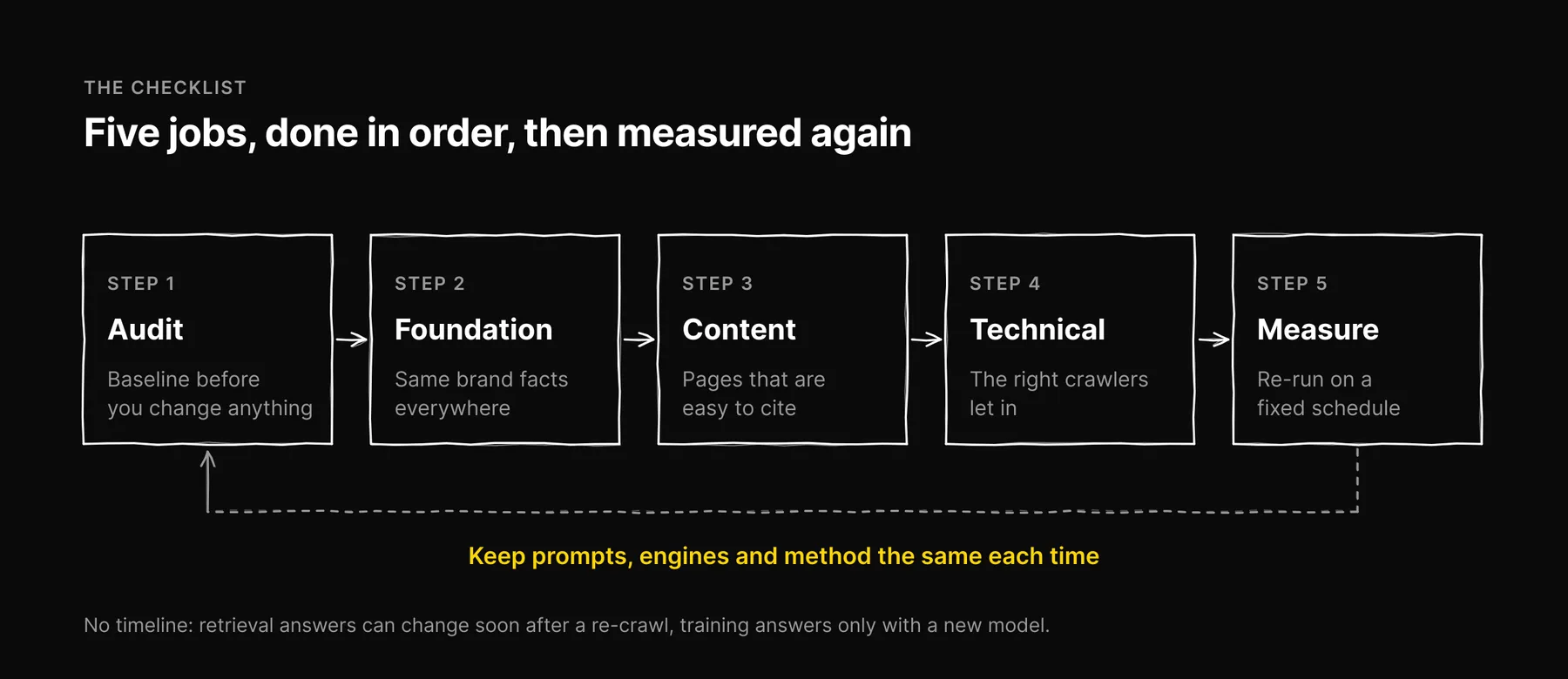
AI visibility optimization comes down to five jobs done in order. Measure how ChatGPT, Claude, Gemini, Perplexity and Google AI Overviews answer your customers' questions today. Make your brand facts consistent everywhere. Write pages that are easy to cite. Let the right crawlers in. Then re-measure on a fixed schedule. This guide covers each step with the specific checks we run in Ezeo, and it links out to our deeper posts rather than repeating them.
One thing this guide won't give you is a timeline. Answers that come from live retrieval can change soon after a page is re-crawled. Answers that come from a model's training data change only when the provider ships a new model. Nobody outside those companies controls either schedule.
Step 1: Audit your current AI visibility
You need a baseline before you change anything, or you won't know what worked.
Build a prompt set
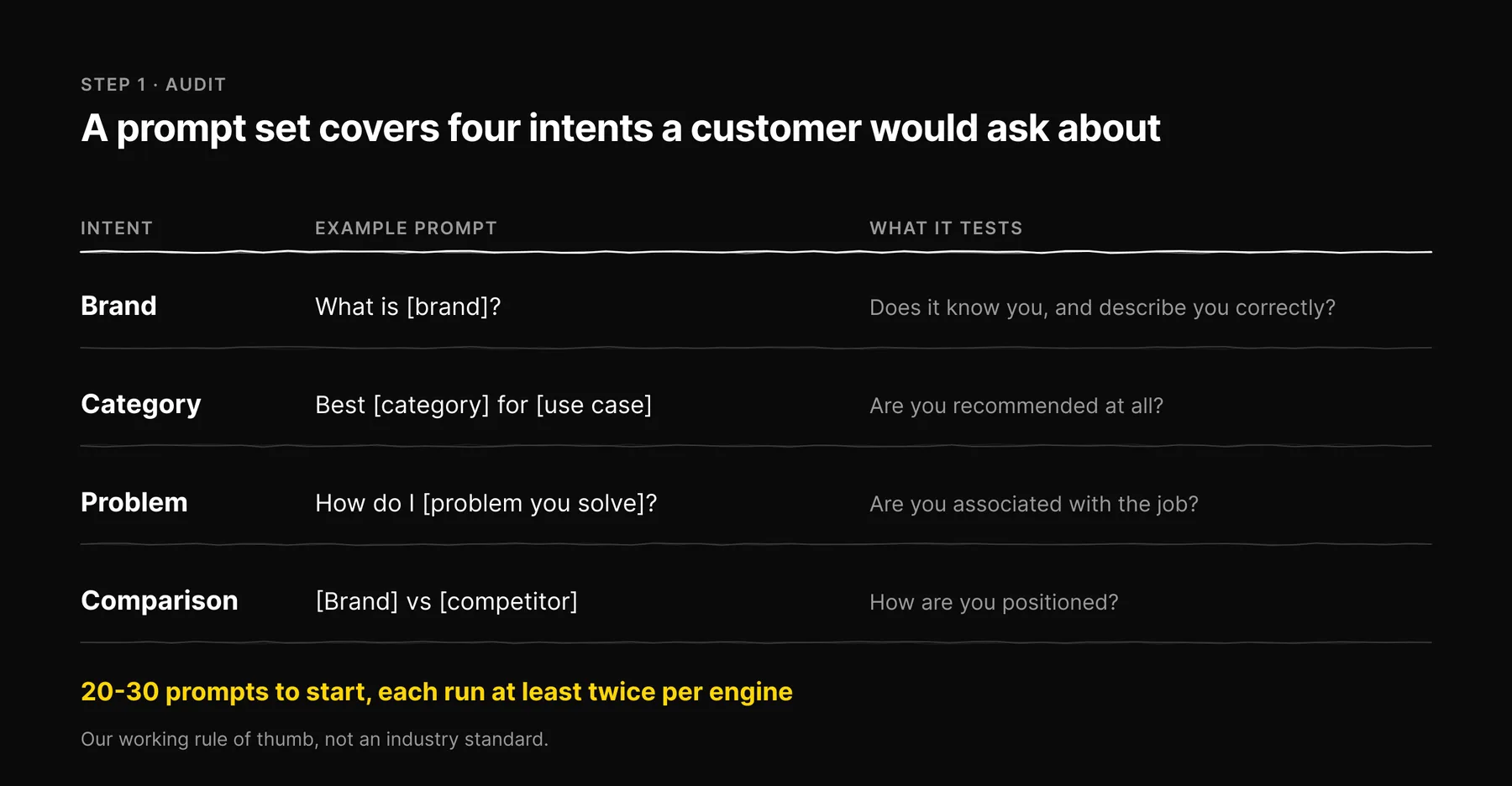
Write the questions a real customer would ask, grouped by intent:
- Brand: "What is [brand]?" and "Is [brand] any good?" Tests whether the engine knows you and describes you correctly.
- Category: "Best [category] for [use case]." Tests whether you are recommended at all.
- Problem: "How do I [problem you solve]?" Tests whether you are associated with the job.
- Comparison: "[Brand] vs [competitor]." Tests how you are positioned.
We start clients with 20-30 prompts. That is our working rule of thumb, not an industry standard. Fewer than that and one odd answer skews the picture; many more and nobody reads the answers.
Run each prompt more than once
The same prompt to the same engine can name different brands on different days, and answers shift with location and logged-in state. Run each prompt at least twice per engine, in a clean session, and record the spread. A single screenshot doesn't count as an audit.
Record the right columns
For each run: date, engine, prompt, brand mentioned (yes / no / not checked), URLs cited, competitors named, and whether the description of your brand was accurate. Keep "not checked" and "error" separate from "no". A failed request is not evidence of zero mentions.
The full method, including how to score accuracy, is in our AI visibility audit how-to.
Read the baseline against competitors
A mention rate on its own tells you little. It only means something next to the competitors asked about in the same prompts. Compare yourself with the three or four brands that keep appearing in your category answers, and note which URLs the engines cite for them. Those URLs are your to-do list.
Step 2: Build the foundation
This step makes sure that when an engine does find you, it gets your facts right.
Make brand facts consistent
- Use one spelling of the brand name, one short description and the same product names on your site, social profiles, marketplaces and directory listings.
- Fix out-of-date listings first. Wrong prices, old addresses and discontinued products are exactly the kind of error that gets repeated in AI answers.
- Keep a plain About page that says who you are, what you sell, who it's for and where you operate, in full sentences.
Add structured data that matches the page
Use JSON-LD: Organization on the homepage (with sameAs links to your official profiles), Article on posts, Product on product pages, BreadcrumbList for navigation. Only mark up what is visible on the page. Structured data helps machines read the page correctly. It won't earn you a citation by itself.
Add an llms.txt file, and keep expectations low
The file is /llms.txt, plural. The format was proposed by Jeremy Howard of Answer.AI in September 2024 at llmstxt.org. It is a Markdown file with an H1 naming the site (the only required part), a one-line > summary, then H2 sections of links to your most useful pages.
Be honest about its status: no major AI provider has publicly committed to reading llms.txt when answering, and Google has said it does not use it. We add one because it is cheap and helps agents and developer tools that do fetch it. Ours is at ezeo.ai/llms.txt if you want an example. More detail is in our llms.txt explainer.
Step 3: Write content that is easy to cite
Generative engines lift claims, definitions and lists from pages they retrieve. Make those easy to find and easy to trust.
- Answer first. Put a direct two-to-four-sentence answer under each question-shaped heading, then the detail.
- Be specific and source it. In the GEO research paper, adding citations, quotations and statistics raised a source's visibility in generated answers on the authors' benchmark, while keyword stuffing did not. Treat that as a benchmark result, not a law, but the direction is consistent with what we see.
- Use real structure. Descriptive H2/H3 headings, numbered steps for processes, tables for comparisons. Structure helps both readers and parsers find the one sentence they need.
- Write the pages the engines are citing for competitors. If category answers keep citing comparison pages, buying guides or pricing explainers, you probably need one of your own, and it has to be better than theirs.
- Earn mentions elsewhere. Engines often cite review sites, forums such as Reddit, and trade press. Being discussed accurately on pages you don't own matters alongside your own site.
- Date your updates. A visible "updated" date and a genuine revision help readers and engines judge freshness.
For what actually gets pulled into answers, see the content quality signals AI answers draw on.
Step 4: Technical optimization
Know which crawler does what
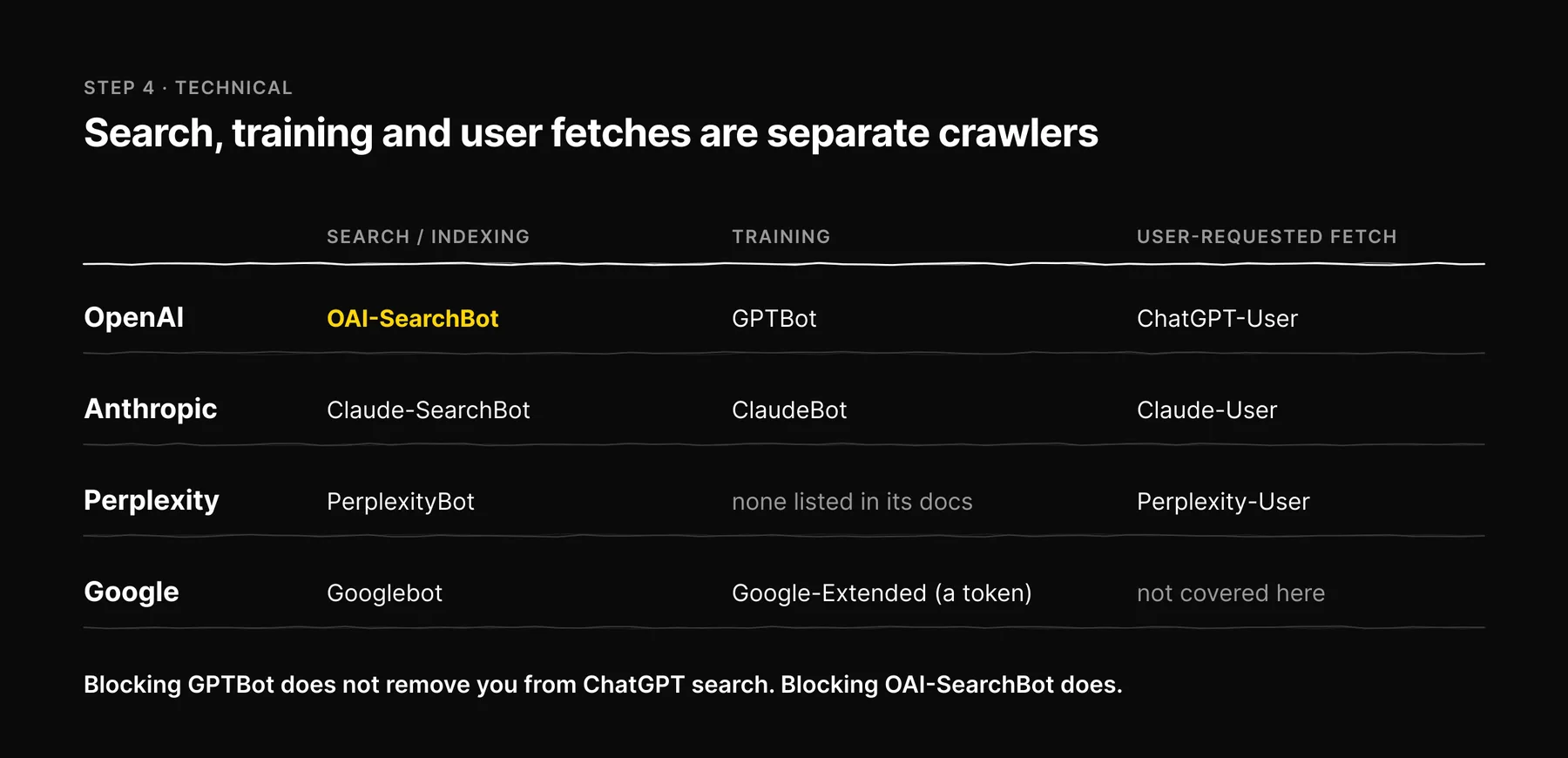
Most AI companies now run separate agents for search, for training, and for fetching a page a user asked about. Blocking one does not block the others. This is the part most sites get wrong.
| Company | Search / indexing | Training | User-requested fetch |
|---|---|---|---|
| OpenAI | OAI-SearchBot | GPTBot | ChatGPT-User |
| Anthropic | Claude-SearchBot | ClaudeBot | Claude-User |
| Perplexity | PerplexityBot | (none listed in its docs) | Perplexity-User |
Googlebot | Google-Extended (a robots.txt token for Gemini training and grounding, not a separate crawler) | (separate fetchers, not covered here) |
Sources: OpenAI's crawler docs, Anthropic's help centre, Perplexity's bot docs and Google's crawler list.
What follows from that table:
- Blocking
GPTBotdoes not remove you from ChatGPT search. BlockingOAI-SearchBotdoes. You can opt out of training and stay visible in search. Google-Extendeddoes not affect Google Search or AI Overviews. It controls whether your content is used for Gemini model training and grounding. AI Overviews are built from the normal index crawled by Googlebot.- For AI Overviews, Google's guidance on AI features lists no extra requirements beyond normal Search: the page must be indexed and eligible to show a snippet.
nosnippetandmax-snippetlimit what can be shown there too, so check you haven't set them on pages you want cited.
Repeat your disallows in every named group
Under the robots.txt standard (RFC 9309), a crawler obeys only the most specific User-agent group that matches it and ignores the * group when it has its own. So if you add a named group for an AI bot and forget your private-path rules, you have opened those paths to exactly that bot. Ezeo's own robots.txt allows AI crawlers on public pages and repeats the /app/ and /api/ disallows in every named group it defines. The example below is an illustration of the pattern, using two search crawlers, not an excerpt of our file:
User-agent: *
Disallow: /app/
Disallow: /api/

User-agent: OAI-SearchBot
Allow: /
Disallow: /app/
Disallow: /api/

User-agent: Claude-SearchBot
Allow: /
Disallow: /app/
Disallow: /api/
Serve content in the HTML
Make sure your main content is present in the server response, through server-side rendering or static generation. We don't rely on AI fetchers running JavaScript, so a page that only fills in after scripts run is a risk we avoid.
Cover Bing, without overrating it
ChatGPT search draws on OpenAI's own index plus third-party search providers, and Bing has been one of them. Verifying your site in Bing Webmaster Tools and pinging IndexNow when pages change is worth the small effort. It won't settle your ChatGPT visibility on its own, so treat it as one input among several. For the ChatGPT-specific work, see how to get ChatGPT to recommend your brand.
Validate your markup
Run key templates through the Schema.org validator and Google's Rich Results Test after every template change, not once.
Step 5: Measure and iterate
Re-run the same prompt set on a fixed schedule. Ezeo scans weekly. If you track by hand, monthly is workable. What matters is keeping the prompts, engines and method the same, so a change in the numbers reflects a change in the answers and not in how you asked.
| Metric | How to measure | Watch out for |
|---|---|---|
| Mention rate | Share of checked prompt runs that name your brand, per engine | Count only runs that were actually checked in the denominator |
| Citations | Which of your URLs are cited, and how often | Third-party URLs cited for you matter too |
| Accuracy | Share of mentions with correct facts, judged by a person | No automated count catches a wrong price |
| Share of voice | Your mentions compared with named competitors in the same answers | Keep the competitor set fixed |
| AI referral traffic | Sessions from AI engines in your analytics, by referrer | Many answers send no click, so this undercounts visibility |
Set your targets from your own baseline, not from a generic benchmark.
Two rules we apply to our own data:
- "Not measured" is not zero. If an engine wasn't checked, record a blank or a dash. A failed check is not a zero.
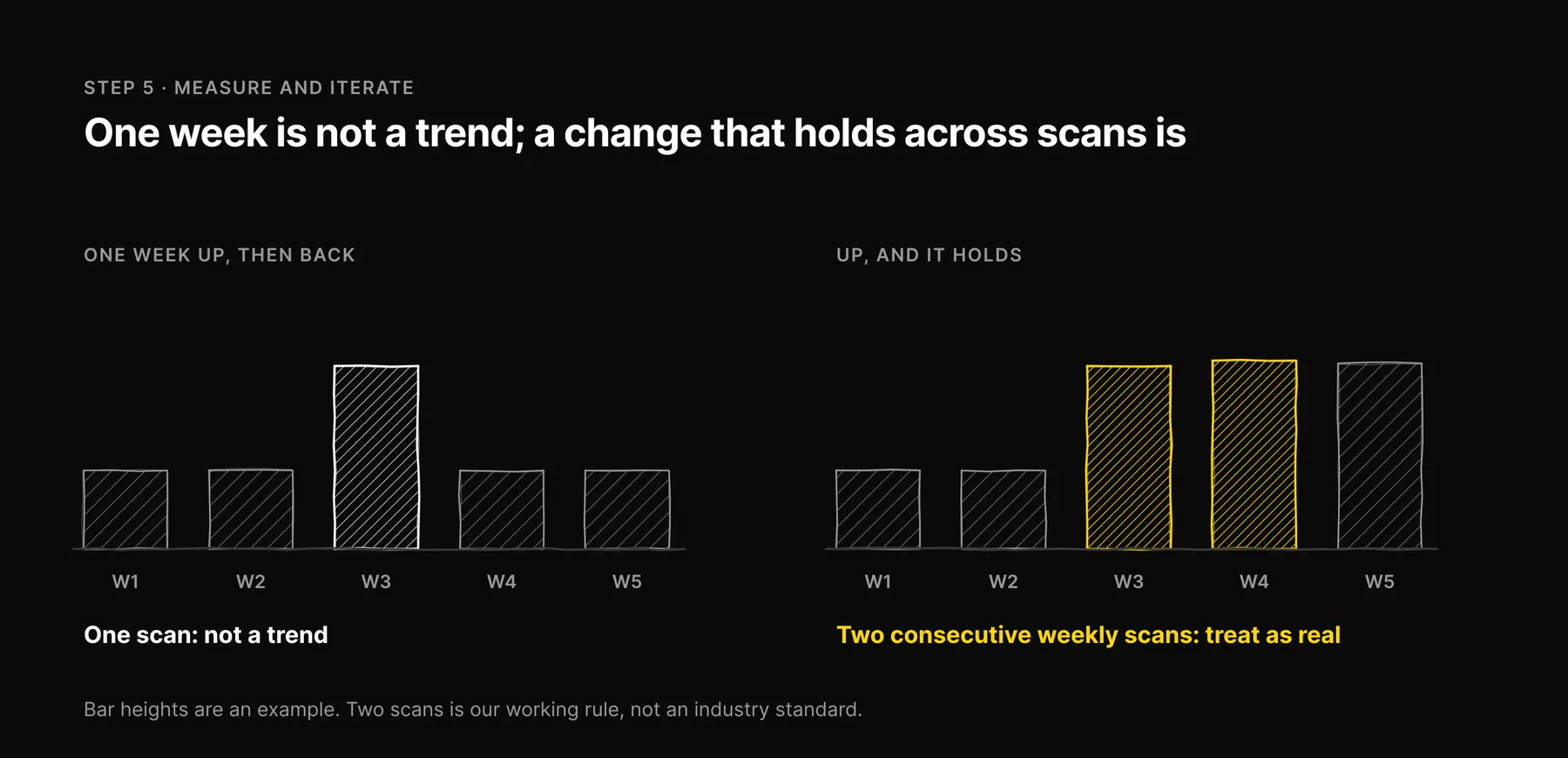
- Don't call one week a trend. Our working rule, not an industry standard: we treat a change as real when it holds across at least two consecutive weekly scans.
When something moves, trace it back: which prompt, which engine, which cited URL changed. That tells you whether your change worked or whether the engine simply changed its mind.
What changed in the September 2026 update: The file is llms.txt, not llm.txt; Ezeo tracks five AI engines, not six; allowing Google-Extended does not affect AI Overviews; and the results timeline, score bands and targets, which had no source, are removed.
Frequently asked questions

Written by
Jose Antonio Mijares
SEO & GEO Expert | Founder at Ezeo