
Updated September 2026. This is a step-by-step method for auditing how ChatGPT, Claude, Gemini, Perplexity and Google AI Overviews describe and recommend your brand, with a spreadsheet you can run by hand.
Write a fixed set of prompts about your brand and category, run each one on all five engines at least three times under recorded conditions, and log whether you were mentioned, how you were described and which URLs were cited. Keep "not checked" separate from "not mentioned". The result is a baseline you can repeat, which is worth more than any single screenshot.
AI visibility audit: a repeatable check of whether AI answer engines mention your brand for the questions your buyers ask, how accurately they describe it, and which sources they cite when they do.
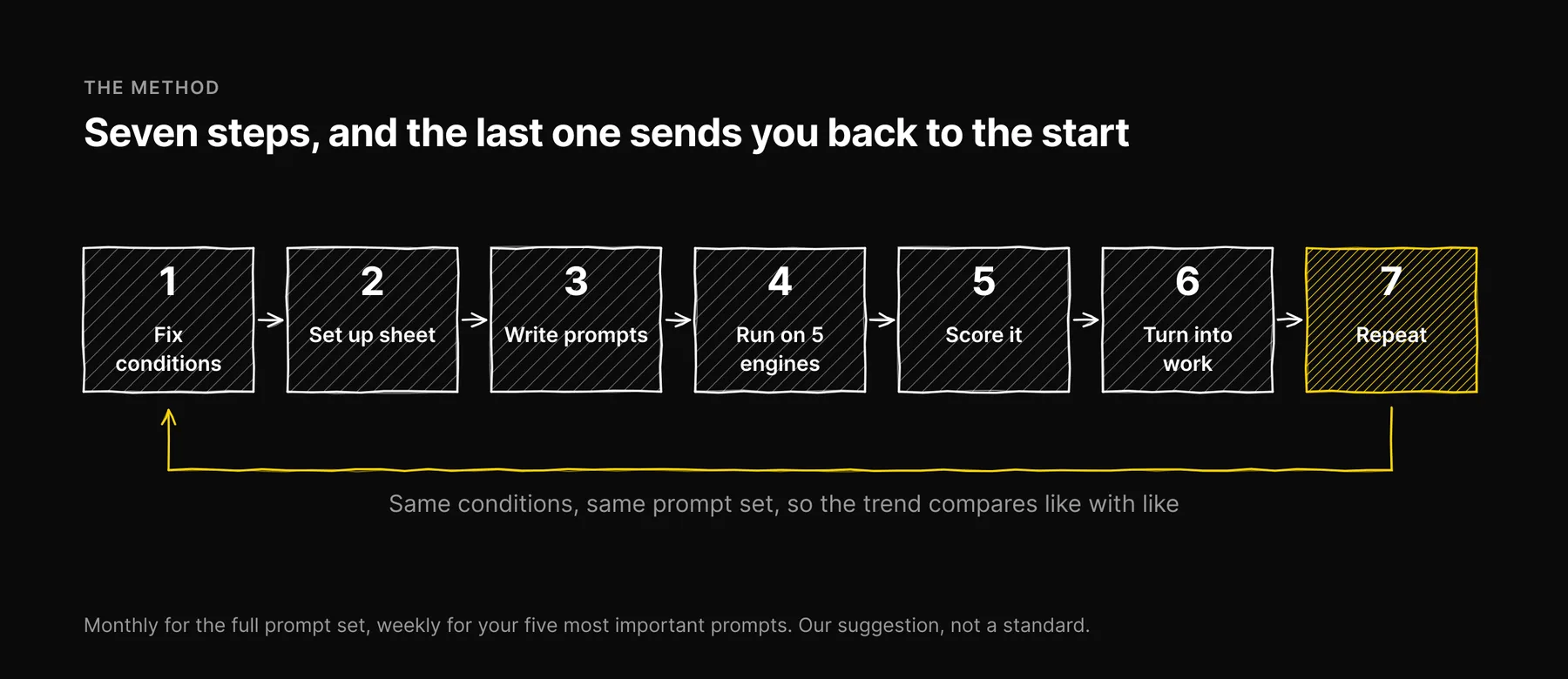
Step 1: Fix your conditions before you run anything
AI answers vary. The same prompt to the same engine can name different brands on different days, and results differ between logged-in and logged-out use and by location. If you do not hold the conditions steady, your audit measures the noise.
Decide and write down, once:
- Account state. Logged out where the engine allows it, or a clean account with memory and personalization off. Do not audit from the account you use every day; it knows who you are.
- Location. Where you are running from, and whether you are on a VPN. Google results in particular change by location.
- Mode. Which model or mode you used, and whether web search was on. Note it per run if the engine decides for itself.
- Runs per prompt. We use three. It is enough to see whether an answer is stable, and small enough to do by hand.
Step 2: Set up the spreadsheet
One row per run, not per prompt. These are the columns we use.
| Column | What goes in it | Example |
|---|---|---|
| Date | When the run happened | 2026-09-22 |
| Engine | One of the five | Perplexity |
| Conditions | Account state, location, mode | Logged out, Miami, default |
| Prompt ID and text | The exact prompt, never paraphrased | C3: "Best SEO tools for small business" |
| Run | 1, 2 or 3 | 2 |
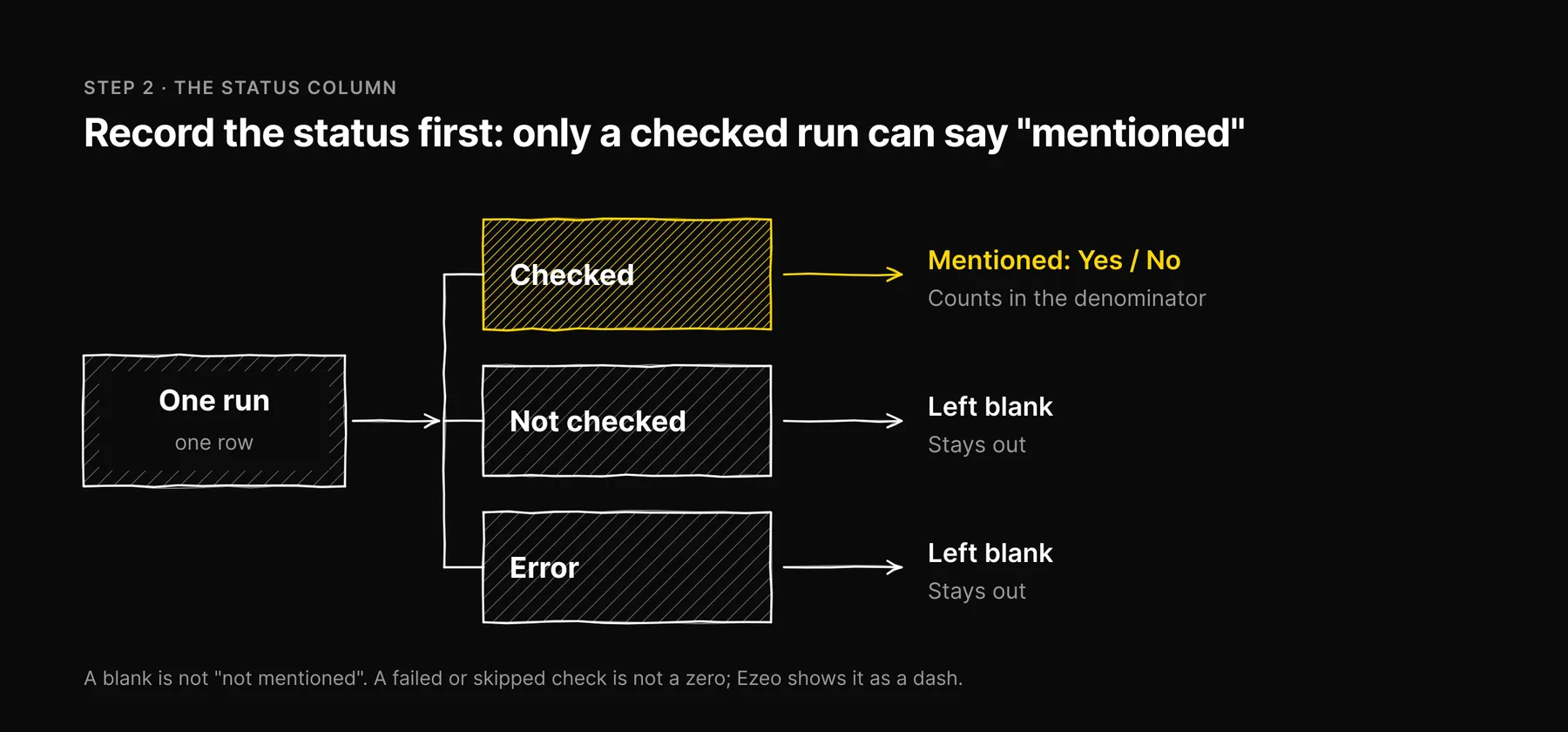
| Status | Checked / Not checked / Error | Checked |
| Mentioned | Yes / No (only if Checked) | No |
| Accurate | Correct / Partly / Wrong, with the wrong claim noted | n/a |
| Competitors named | Every brand in the answer | Three competitors, listed by name |
| Cited URLs | Every source link shown, yours and others | Two review sites, one forum thread |
| Notes | Anything unusual | "Answer only listed enterprise tools" |
Why the Status column matters
A common audit error is a blank cell read as "not mentioned". If you skipped Claude that week, or Google showed no AI Overview, or the engine errored, that run was not measured. It is not a zero. In Ezeo we show a dash for anything we did not check, never a 0, because a failed check is not a zero. Record the status first, and only fill in "Mentioned" when the status is Checked.
Step 3: Write the prompt set
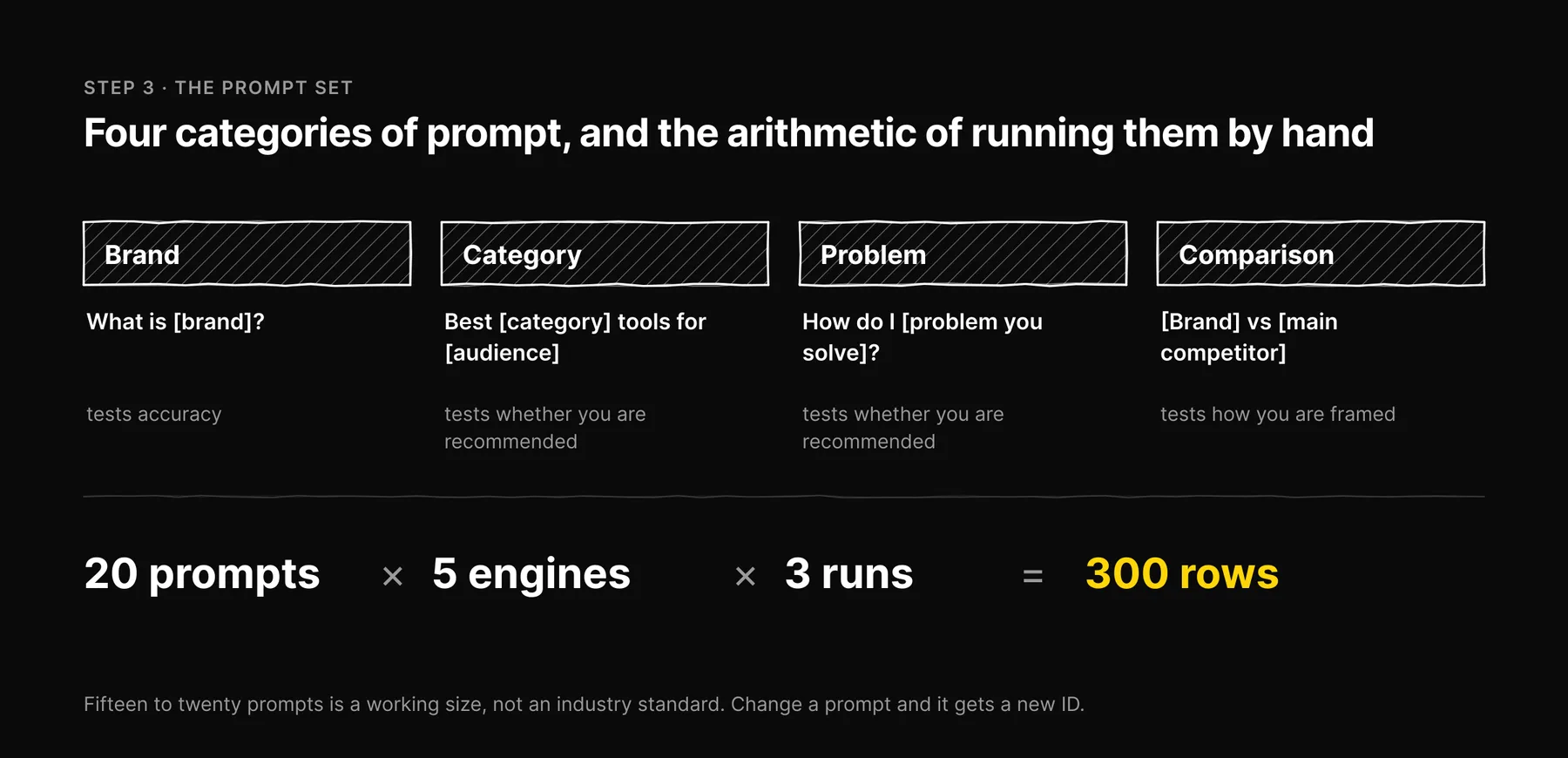
Use four categories, and write the prompts the way a buyer would type them. Fifteen to twenty prompts is our working size, not an industry standard: enough to cover the four categories, few enough to run by hand. Keep in mind the arithmetic. Twenty prompts, five engines and three runs is 300 rows.
Brand prompts
- "What is [your brand]?"
- "[Your brand] review"
- "Is [your brand] good for [your audience]?"
Category prompts
- "Best [category] tools for [audience]"
- "Top [category] platforms in 2026"
- "[Category] software for [use case]"
Problem prompts
- "How do I [problem you solve]?"
- "What tools help with [problem you solve]?"
Comparison prompts
- "[Your brand] vs [main competitor]"
- "[Competitor] alternatives"
Brand prompts test accuracy. Category and problem prompts test whether you are recommended at all, and they are the ones that matter most for new customers. Keep the set fixed between audits. If you change a prompt, give it a new ID so you do not compare different questions.
Step 4: Run it on the five engines
Open a fresh chat for every run, so earlier answers in the conversation do not leak into later ones.
Google AI Overviews and AI Mode
Search from a private window. AI Overviews do not appear for every query, so record three distinct outcomes: no AI Overview shown, shown without your brand, shown with your brand. "No AI Overview shown" is Not checked for that run, not a miss. If you also check AI Mode, log it as its own engine row, since the answers differ. Google says there is nothing extra to do to be eligible beyond being indexed and snippet-eligible, per its guidance on AI features.
ChatGPT
Use a fresh chat each time and note whether the answer searched the web and showed sources. Answers that search and answers that do not can differ a lot for the same prompt. Record every cited URL.
Perplexity
Perplexity shows its sources alongside the answer, which makes it the easiest engine to audit. Record every URL, not just yours. The list of third-party sites it cites for your category is one of the most useful outputs of the whole audit.
Claude
Claude has had web search since 2025, so it is not limited to what it learned in training. Note whether it searched on each run. If it answers without searching, you are seeing what the model learned; if it searches, you are seeing what it found.
Gemini
Use the Gemini app, the product people actually use, not Google AI Studio, which is a developer console for calling models directly. Its answers can differ from the consumer app, so it does not tell you what your buyers see. Gemini can ground answers in Google Search results, so note whether sources are shown.
What about Reddit?
Reddit is not one of the five, and Ezeo does not score it. You do not need to audit it as an engine. What you should do is look for Reddit threads in the cited URLs above. If they show up for your category prompts, Reddit is a source that shapes answers in your market, and the threads themselves are worth reading.
Step 5: Score it
Calculate from Checked runs only. Not-checked and error rows stay out of the denominator.
| Measure | How to calculate it |
|---|---|
| Mention rate | Runs that mention you, divided by runs checked, per engine and overall |
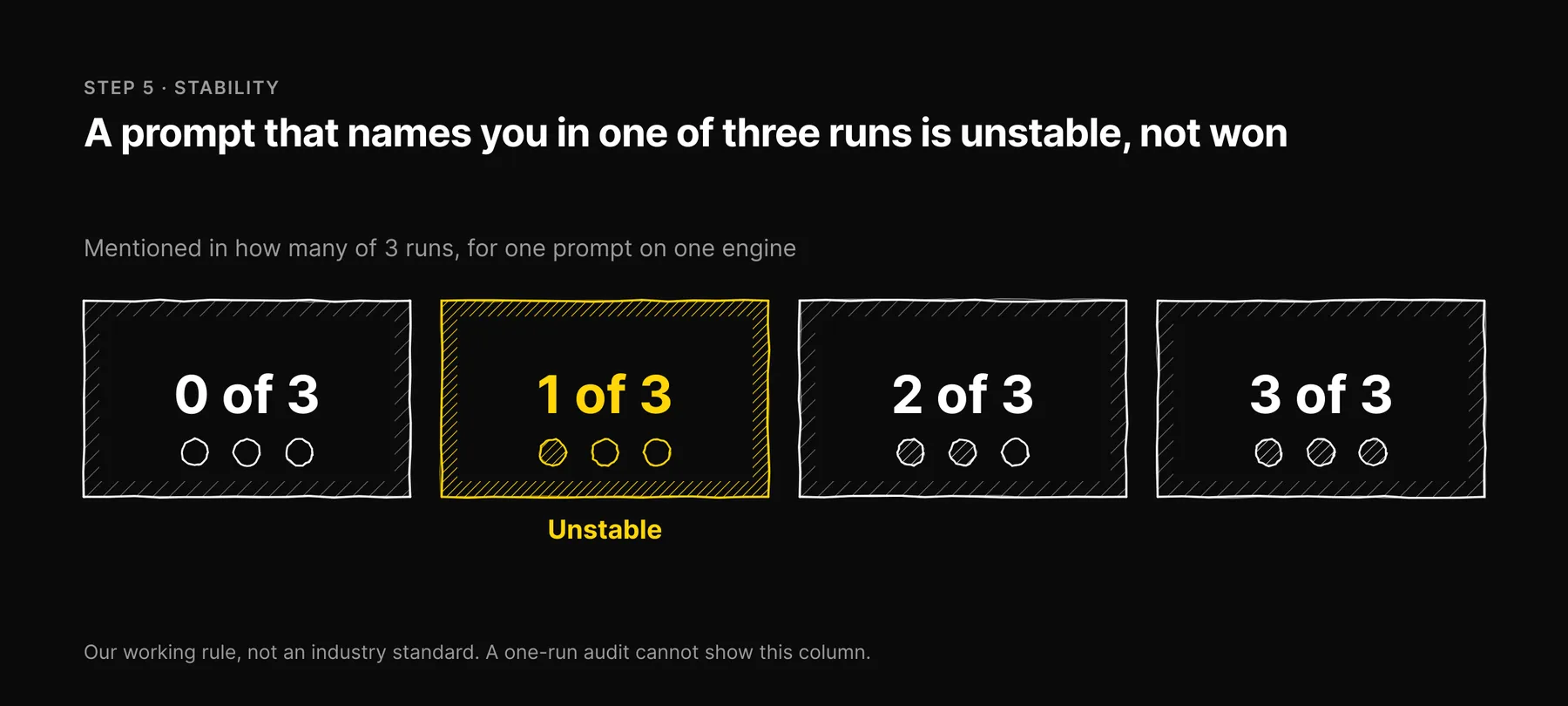
| Stability | For each prompt and engine: mentioned in 0, 1, 2 or 3 of 3 runs |
| Accuracy | Share of mentions marked Correct, plus a list of every wrong claim |
| Competitor share | How often each competitor is named across the same checked runs |
| Cited sources | Which of your URLs are cited, and which third-party URLs are cited instead |
Stability is the column a one-run audit cannot show. Our working rule, not an industry standard: a prompt that names you in one of three runs is unstable, not won. Report it as such.
There is no sourced industry benchmark for a good mention rate. It depends on the category, the number of competitors and the prompt set. Compare yourself to two things you can measure: your own last audit, and named competitors on the same prompts.
Step 6: Turn findings into work
- Not checked on an engine you care about. Fix the gap first. You cannot act on what you did not measure.
- Checked, never mentioned. Start with access: does robots.txt allow that engine's crawler? Our guide to the five AI search engines lists the user-agents. Then work through the complete AI visibility checklist.
- Mentioned, but described wrongly. Look at the cited URLs for the source of the wrong claim. Fix your own page first, then ask third-party sites to correct theirs. An
/llms.txtfile with an accurate summary is cheap to add, though no major engine has committed to reading it; see what llms.txt is and what it can and cannot do. - Competitors named, you not. Check which pages the engines cite for those prompts. If they are comparison pages you are missing from, write an honest one yourself.
- Unstable mentions. Pages that state the answer plainly and cite evidence give engines less reason to swap you out. See the content signals AI models actually cite.
Step 7: Repeat on a schedule
Our suggestion for a manual audit: the full prompt set monthly, and a weekly spot check of your five most important prompts on the engines your buyers use most. Change the prompt set only quarterly, and keep the conditions the same each time, or the trend line compares different things.
This is the method Ezeo runs automatically. Each week we ask the five engines the same fixed prompt set, record mentions and cited URLs, and read Google AI Overviews from the live results page through DataForSEO rather than simulating them. The spreadsheet above is the same idea by hand.
What changed in the September 2026 update: Ezeo audits five engines, not six (Reddit is a source, not an engine), Claude has had web search since 2025, Gemini should be checked in the Gemini app rather than Google AI Studio, and the file is llms.txt, not llm.txt. The unsourced healthy-range targets are removed.
Frequently asked questions

Written by
Jose Antonio Mijares
SEO & GEO Expert | Founder at Ezeo