
Updated September 2026. This post explains what llms.txt is, what it can and cannot do for a website today, and how to write one that stays accurate.
llms.txt is a plain Markdown file served at /llms.txt on your domain. It gives language models and AI tools a short, curated map of your site: who you are, what you offer, and which pages matter, with links. It does not control crawling, it is not a ranking signal, and no major AI provider has publicly committed to reading it when it answers questions. It is cheap to add and useful to the agents and developer tools that do fetch it, which is why we keep one.
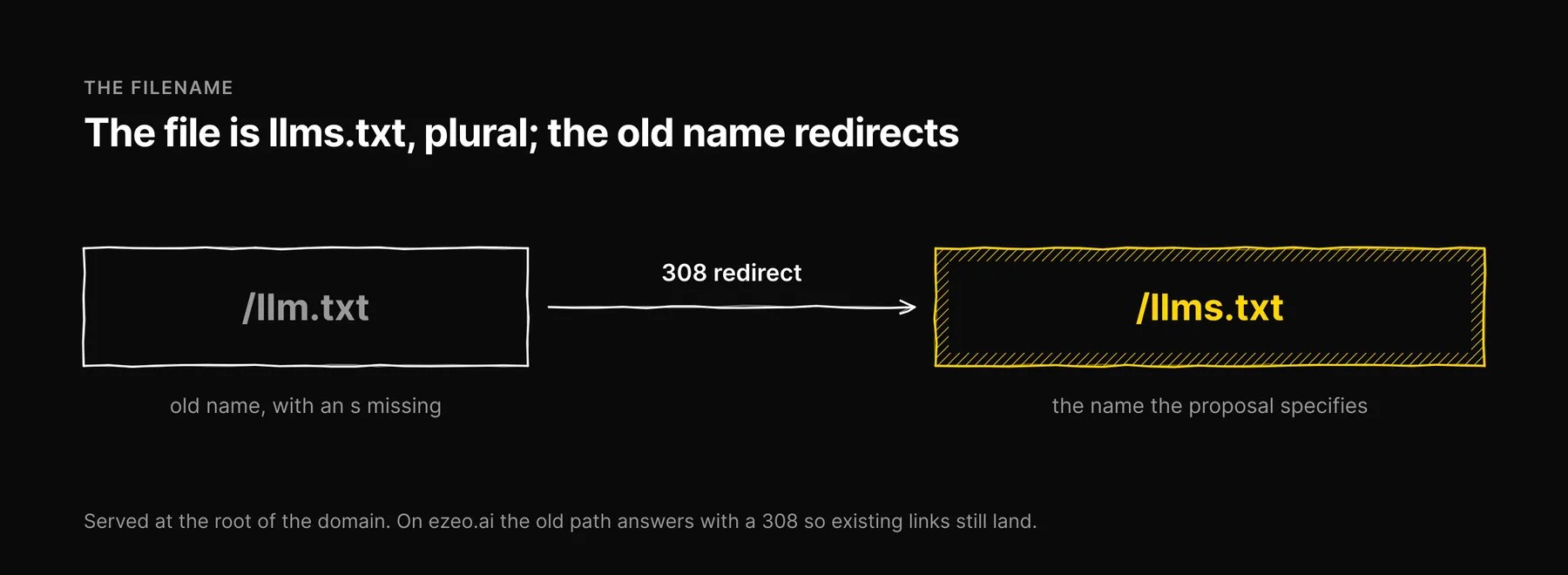
The filename is llms.txt, plural
The proposal specifies llms.txt, with an s, and its default location is the root of the domain.
If you published /llm.txt, rename it and add a permanent redirect from the old path to the new one. That is what we do on ezeo.ai: /llm.txt answers with a 308 redirect to /llms.txt, so any link to the old name still lands on the right file.
Where llms.txt comes from
Jeremy Howard of Answer.AI proposed llms.txt in September 2024. The specification lives at llmstxt.org. The problem it addresses is practical. A model working with a limited context window does badly with a website as it is actually served: navigation, scripts, cookie banners and layout markup crowd out the content. A site owner knows which pages explain the business. llms.txt lets the owner say so, once, in a format a model can read without cleanup.
It is a proposal, not a standard with a governing body, and it is still young. Treat what follows as the convention as written today.
The format
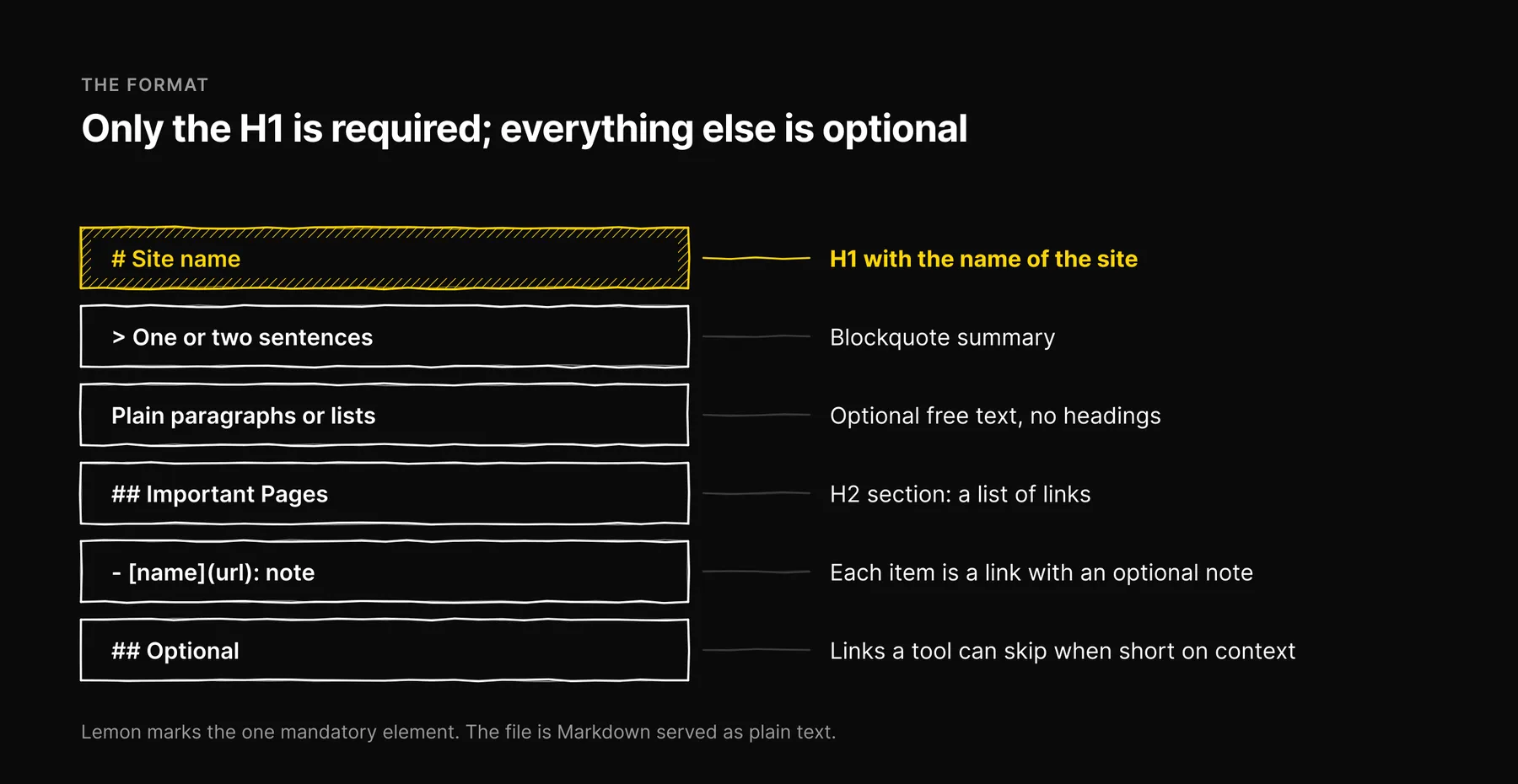
The file is Markdown with a fixed order of parts. Only the first is required.
- An H1 with the name of the site or project. This is the only mandatory element.
- A blockquote summary. One or two sentences, starting with
>, that say what the site is. Write it so a reader who sees nothing else still understands you. - Optional free text. Paragraphs or lists with detail that helps interpret the rest of the file. No headings in this part.
- H2 sections of links. Each section is a Markdown list, and each item is a link with an optional note:
[name](url): note. - An optional section named
Optional. Links under an H2 called exactly "Optional" are ones a tool can skip when it is short on context.
Here is a trimmed version of the file we serve at ezeo.ai. The full one is public at ezeo.ai/llms.txt.
# Ezeo SEO

> Ezeo is an AI-powered SEO, GEO, and AEO workspace for agencies and
> in-house teams, built by JAMAK in Miami, FL.

Ezeo helps brands measure and improve visibility across ChatGPT, Claude,
Gemini, Perplexity, and Google AI Overviews.

## About

- [About Ezeo](https://ezeo.ai/about): who builds Ezeo and why

## What Ezeo Does

- GEO visibility monitoring across 5 tracked AI surfaces
- SEO analytics from Google Analytics 4, Search Console, and Clarity
- Backlinks, rankings, competitor monitoring, and website audits

## Important Pages

- [Documentation](https://ezeo.ai/documentation): how to set up and use Ezeo
- [Blog](https://ezeo.ai/blog): articles on SEO and generative engine optimization
- [Sitemap](https://ezeo.ai/sitemap.xml): every public URL

## Contact

- [Contact Ezeo](https://ezeo.ai/contact)

Last updated: 2026-09-22
Two things in that file are our own habits rather than the spec. The "What Ezeo Does" section is a plain list without links, which the format allows in the free-text area but which we put under a heading because it reads better. And the "Last updated" line at the bottom is not part of the proposal at all. We add it because a dated file is easier to audit: anyone reading it, human or tool, can see how stale it might be.
Companion conventions: llms-full.txt and .md pages
The proposal describes two related ideas that often travel with the main file.
/llms-full.txtholds the full text of the important pages in one file, so a tool can load everything in a single request instead of following each link. It suits documentation sites and small sites. On a large site it gets big fast, and it goes stale whenever any included page changes.- Markdown versions of pages. The proposal suggests serving a clean Markdown copy of a page at the same URL with
.mdappended. That gives a tool the content without the page chrome. It is most common on developer documentation, where the audience is already using AI coding tools.
Neither is required. Start with /llms.txt. Add the others if your audience includes developers or agents that will use them.
Who actually reads it today
This is the part most write-ups get wrong.
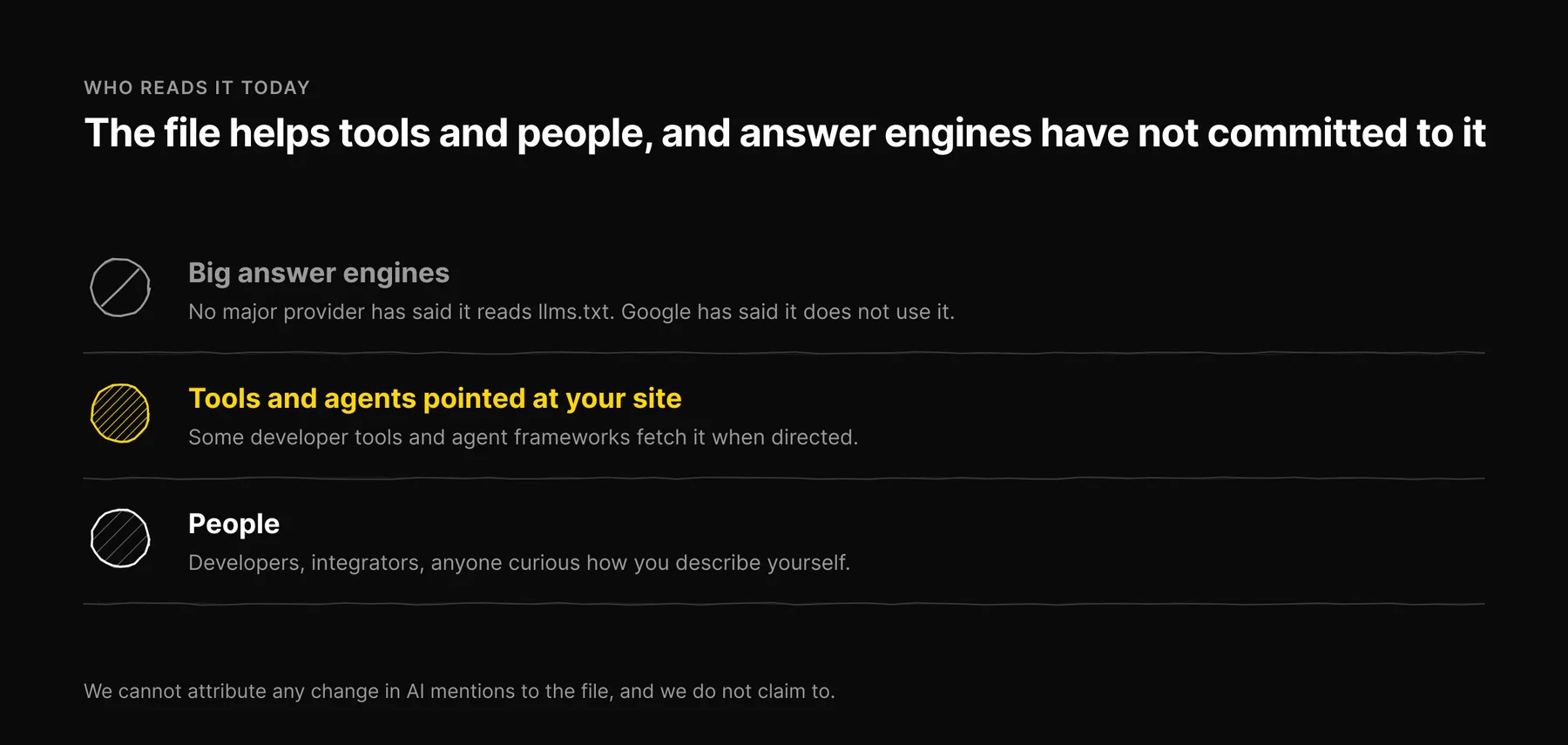
- The big answer engines have not committed to it. No major AI provider has publicly said it reads llms.txt when generating answers. Google has said publicly that it does not use it.
- Tools and agents can use it when pointed at it. Some developer tools, coding assistants and agent frameworks fetch llms.txt when a user or developer directs them to a site. In that setting the file does real work: it tells the tool where the useful pages are.
- People read it. Developers, integrators and anyone curious about how you describe yourself. A clean one is a small signal that you pay attention to machine-readable surfaces.
In Ezeo we measure brand visibility by asking ChatGPT, Claude, Gemini, Perplexity and Google AI Overviews the same set of prompts every week and recording who is mentioned and which URLs are cited. Nothing in those answers tells us whether an engine read a site's llms.txt, so we cannot attribute any change in mentions to the file, and we do not claim to. If a vendor tells you llms.txt raised your AI visibility, ask how they isolated it.
How llms.txt relates to robots.txt, sitemaps and schema
These files answer different questions. None of them replaces another.
| File | Question it answers | Who acts on it |
|---|---|---|
robots.txt | Which paths may each crawler fetch? | Crawlers that honour it, including search and AI crawlers |
sitemap.xml | Which URLs exist, and when did they change? | Search engine crawlers |
| Schema markup (JSON-LD) | What facts describe this page and the entity behind it? | Search engines, and parsers that read page markup |
llms.txt | Which pages best explain this site, in a form a model can read? | Tools and agents that choose to fetch it |
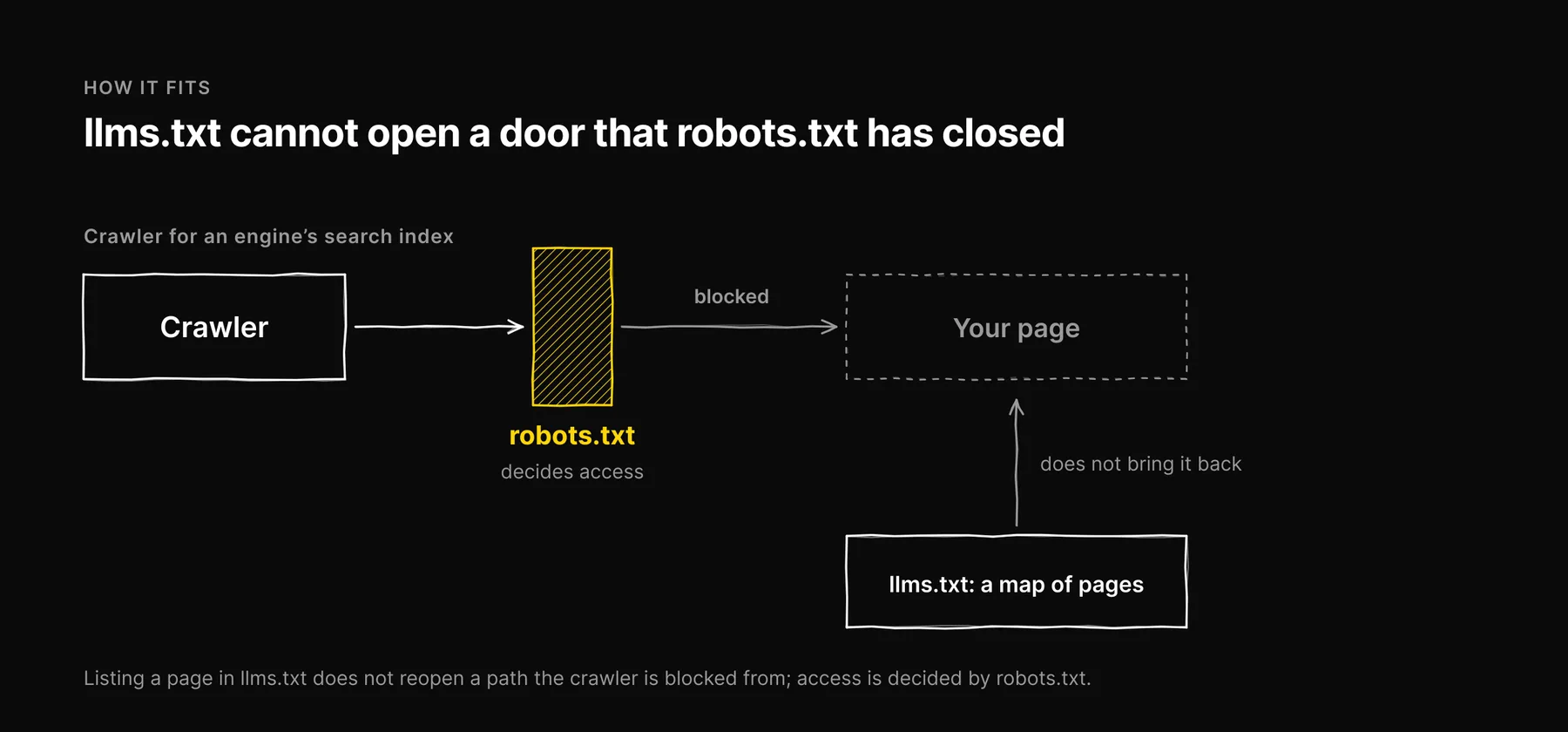
The practical consequence: llms.txt cannot open or close a door. If your robots.txt blocks the crawler an engine uses for its search index, listing a page in llms.txt does not bring it back. Access is decided by robots.txt, following the rules in RFC 9309.
One robots.txt detail catches a lot of sites, so it is worth a paragraph here. A crawler obeys only the most specific User-agent group that matches it, and it ignores the * group when it has a group of its own. If you add a named group for an AI crawler to welcome it, and forget to repeat your Disallow lines inside that group, you have just opened your private paths to exactly that bot. Our own robots.txt repeats the /app/ and /api/ disallows in every named group for this reason. Crawler names and what each one does are documented by OpenAI, Anthropic and Perplexity; our guide to the five AI engines we track covers how each one finds pages.
How to write yours
- Create the file at the root. Save it as
llms.txtand serve it athttps://yourdomain.com/llms.txtas plain text. Open the URL in a browser and confirm you see the raw Markdown, not an HTML page or a 404. - Write the H1 and the summary. Use the name people search for. Keep the blockquote factual: what you are, who it is for, where you are based if that matters. Leave out slogans.
- Add a few link sections. Pick the pages that explain the business: about, products or services, pricing, documentation, contact. Give each link a short note that says what the page contains. Ten to thirty links is plenty for most businesses; that is our editorial judgment, not a rule in the spec.
- Link only to live, canonical URLs. Every link should return a 200 and should be the version of the page you want cited, not a tracking or parameter variant.
- Use "Optional" for secondary material. Legal pages, archives and older posts can go there.
- Date it. End the file with a "Last updated: YYYY-MM-DD" line and change it whenever the content changes.
- Redirect the wrong name. If
/llm.txtever existed on your site, add a permanent redirect to/llms.txt. - Check it after deploys. Links rot. A quick script that fetches every URL in the file and flags anything that is not a 200 is enough.
If your site has several languages, keep one file at the root and add a section per language, or link to each language's main pages. The spec does not define per-language files, so tools are unlikely to look for them.
How we keep ours accurate
We treat llms.txt as documentation, so it gets the same rule as the rest of what we publish: every statement in it has to be true today. When a product description changes, the file changes in the same release. When a page moves, the link moves. When a claim in the file can no longer be checked against a live page, it comes out.
The failure we watch for is drift. A llms.txt written once and forgotten will, within months, describe products you retired and link to pages that redirect. A tool that trusts the file then repeats stale facts about you. The "Last updated" line makes that drift visible, and a link check after each deploy catches the rest.
Common mistakes
- The wrong filename.
llm.txt,LLMS.txtor a file only in a subfolder. The proposal specifies the namellms.txt, and its default location is/llms.txtat the root. - Marketing copy. "The world's leading platform" gives a model nothing it can use. State what you do, for whom, and link to proof.
- Dumping the sitemap. Hundreds of links defeat the point. The file is a curated shortlist.
- Treating it as a ranking fix. If a page is not being cited, the causes are usually the page itself, its crawlability or its reputation. Our post on what gets content cited by AI engines covers the page side.
- Never updating it. A stale file is worse than none, because it gives confident, wrong facts to the tools that read it.
Where it fits in the bigger picture
llms.txt is one small item on a longer list. The work that moves AI visibility is mostly the same work that moves search: pages that answer questions with specific, sourced facts, crawlers allowed in, and a reputation other sites confirm. Our full AI visibility checklist puts llms.txt in that context, and our AI visibility audit guide shows how to check what the engines say about you before and after you change anything.
Add the file. Keep it short, factual and dated. Then spend the rest of your time on the pages it points to.
What changed in the September 2026 update: The filename is llms.txt, not llm.txt, and the format now follows the llmstxt.org proposal. We removed the claim that GPTBot, ClaudeBot and PerplexityBot are beginning to recognize the file, which had no source.
Frequently asked questions

Written by
Jose Antonio Mijares
SEO & GEO Expert | Founder at Ezeo