
Updated September 2026. This post explains how ChatGPT finds brands, the checks that decide whether it can read and cite your site, and how to measure whether it recommends you.
You cannot make ChatGPT recommend your brand, and nobody outside OpenAI can promise it will. What you can do is remove the reasons it can't: let OAI-SearchBot crawl you, serve your key facts in plain HTML, get indexed by the search providers ChatGPT draws on, publish an honest comparison page, and describe your brand the same way everywhere. Then measure with repeated prompts, because one answer on one day tells you very little.
How ChatGPT finds a brand
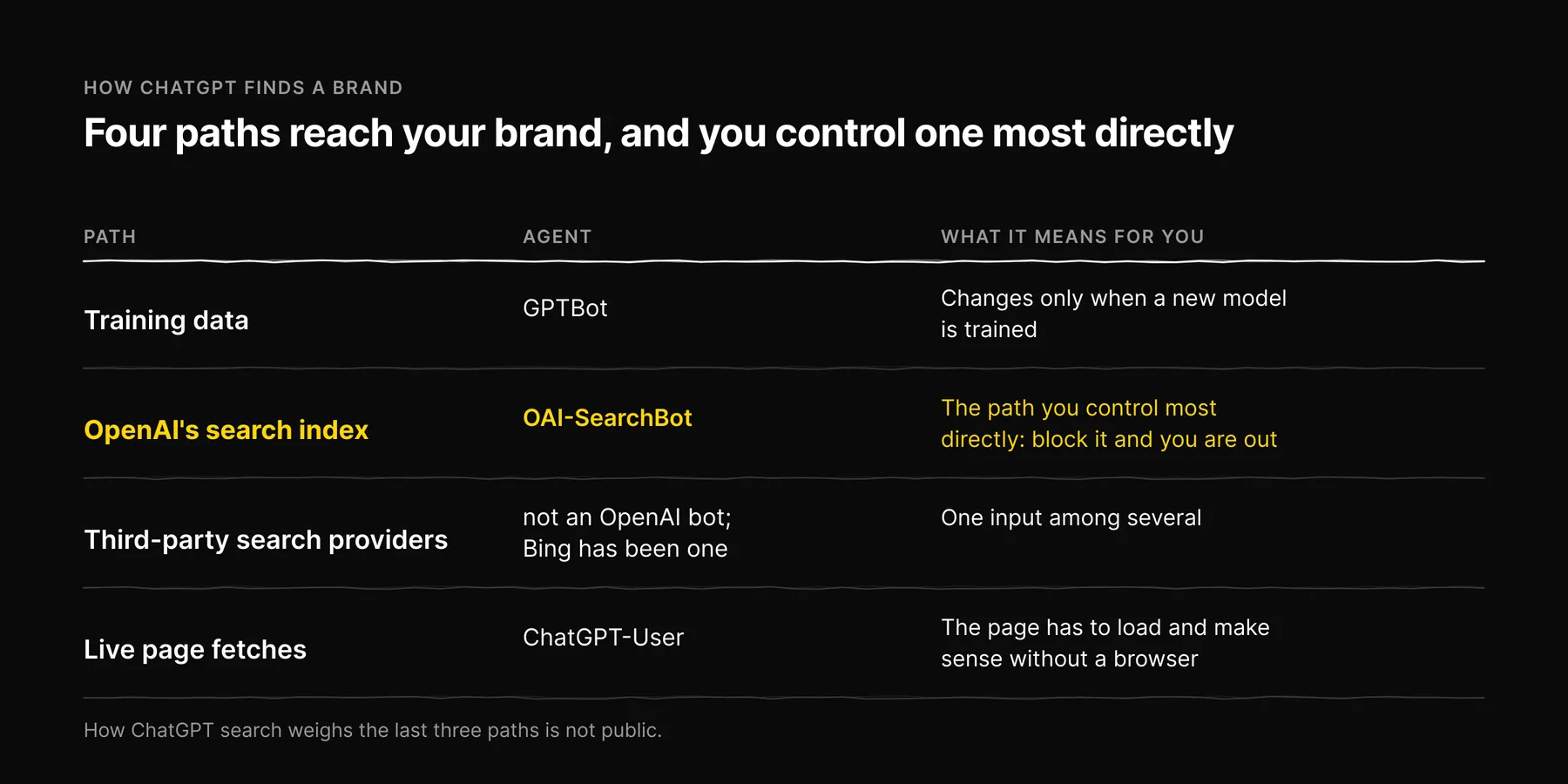
ChatGPT can reach your brand by four paths, and OpenAI documents the agents behind them on its bots page.
| Path | Agent | What it means for you |
|---|---|---|
| Training data | GPTBot collects content that may be used for training | Changes only when a new model is trained. Slow, and you cannot see it happen. |
| OpenAI's search index | OAI-SearchBot indexes sites for ChatGPT search results | The path you control most directly. Block this bot and you are out of ChatGPT search. |
| Third-party search providers | Not an OpenAI bot; Bing has been one of the providers | Worth being indexed in Bing, but it is one input among several. |
| Live page fetches | ChatGPT-User fetches a page when a user's request needs it | Happens when someone pastes your URL or asks about a page. The page has to load and make sense without a browser. |
ChatGPT search launched in October 2024 and combines the last three paths. How it weights them is not public, and we will not pretend otherwise. That is why the practical work below is about access and clarity, not about gaming any one source.
If you are working across several engines, not just ChatGPT, start with our overview of the five AI search engines and the crawler each one uses. This post stays on ChatGPT.
The checks, in the order we run them
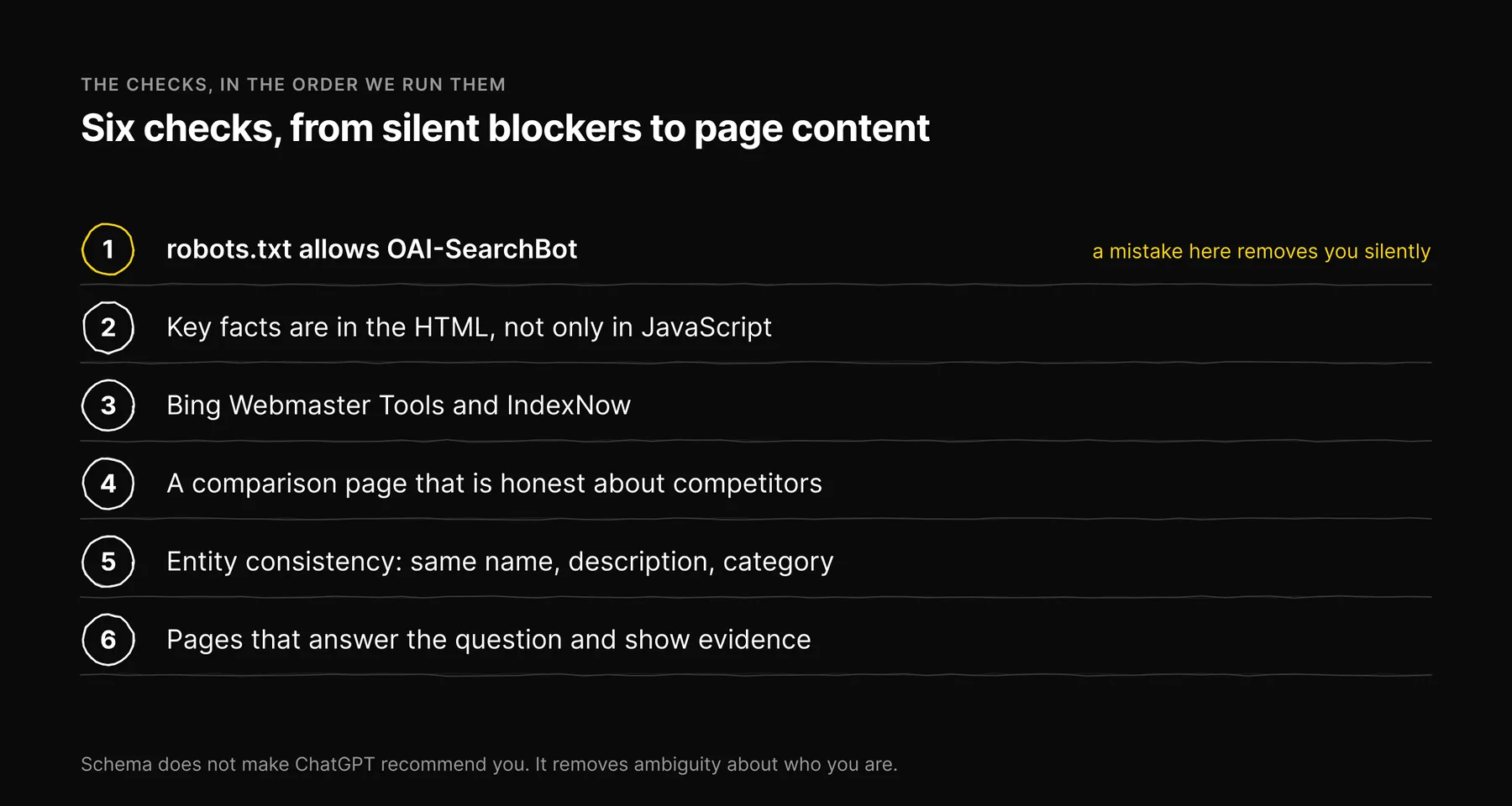
1. robots.txt allows OAI-SearchBot
This is the first thing we look at, because a mistake here removes you silently. Open /robots.txt and check for a group that names OAI-SearchBot or ChatGPT-User, and check what the * group says, since a bot without its own group falls back to it.
Two points trip people up:
- GPTBot and OAI-SearchBot are separate decisions. Blocking
GPTBotkeeps your content out of training. It does not remove you from ChatGPT search. BlockingOAI-SearchBotdoes. If you added a GPTBot block at some point, that is a reasonable training decision; just check the same rule does not also name OAI-SearchBot. - Named groups replace the
*group, they do not add to it. Under RFC 9309 a crawler obeys only the most specific group that matches it. If you add a group forOAI-SearchBotwithAllow: /and forget to repeat yourDisallowlines, you have opened your private paths to that bot. On ezeo.ai every named group repeats the disallows for/app/and/api/for exactly this reason.
User-agent: OAI-SearchBot
User-agent: ChatGPT-User
Allow: /
Disallow: /app/
Disallow: /api/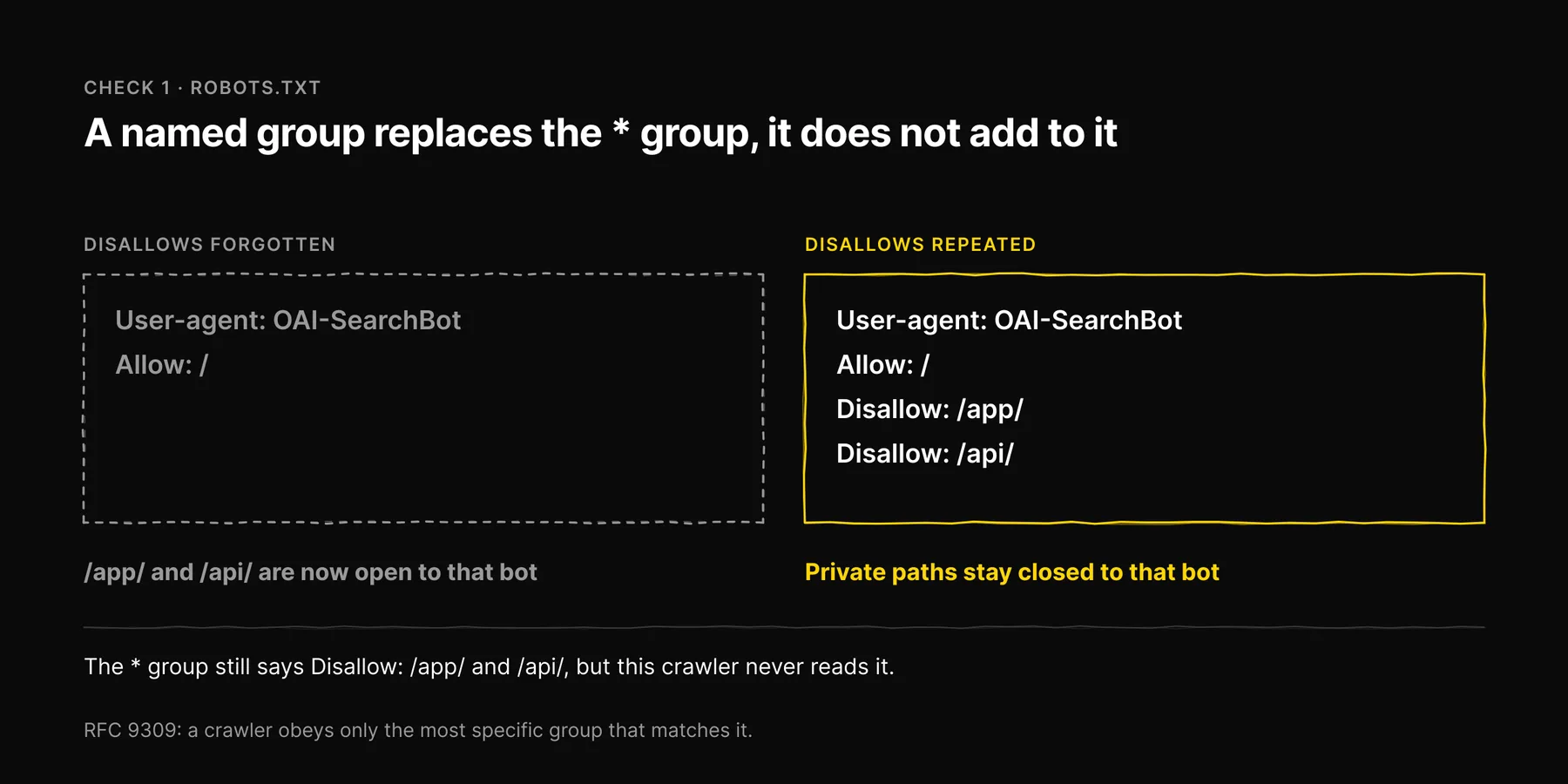
2. Your key facts are in the HTML, not only in JavaScript
Do not assume a crawler runs your JavaScript. If your product description, pricing summary or "who it's for" section only appears after a script runs, a fetch may see an empty shell. The test takes a minute: fetch the raw HTML of the page (view source, or curl it) and search for the sentence you most want quoted. If it is not there, it is not reliably readable.
This matters most for ChatGPT-User. When someone pastes your pricing page and asks "is this worth it?", the answer is built from what that fetch returned.
3. Bing Webmaster Tools and IndexNow
Verify your site in Bing Webmaster Tools, submit your sitemap, and turn on IndexNow so new and updated URLs are announced instead of waiting to be recrawled. It costs an afternoon. We recommend it because Bing has been one of ChatGPT search's providers, and faster indexing there costs you nothing. We do not recommend it as the main lever.
4. A comparison page that is honest about competitors
Recommendation prompts are comparison prompts: "best X for Y", "X vs Y", "alternatives to X". An engine answering them needs a page that compares options. If the only comparisons of your category are written by competitors or affiliate sites, those are what get read.
Write one yourself, and make it one a neutral reader would trust:
- Name the competitors and say what each does well. A page where every competitor loses reads as an ad, to a model as much as to a person.
- Say who your product is not for. It is the most credible sentence on a comparison page.
- Use a table for the facts that are checkable (features, platforms supported, pricing model) and date it.
- Link to the sources for claims about competitors, and update the page when they change.
5. Entity consistency
An engine that meets your brand in several places has to decide they are the same thing. Make that easy. Use the same name, the same one-line description and the same category everywhere: your homepage, About page, Organization schema, social profiles, directory listings, review sites and marketplace pages. If your site says "AI SEO platform", your directory listing says "marketing agency" and an old press release says something else, the model has three stories to choose from.
Validate your structured data with the Schema.org validator or Google's Rich Results Test. Schema does not make ChatGPT recommend you. It removes ambiguity about who you are.
6. Pages that answer the question and show their evidence
Put the direct answer near the top, then the detail. Cite sources for your numbers. The GEO paper (Aggarwal et al., KDD 2024) found on its benchmark that adding citations, quotations and statistics raised a source's visibility in generative answers, and that keyword stuffing did not. We cover this properly in the content signals AI models actually cite.
Third-party mentions
ChatGPT's answer about your category is shaped by what other sites say, not just yours: review sites, industry roundups, directories, community threads. The honest way to influence these is slow. Get listed where your category is listed. Ask real customers for reviews on the platforms your buyers use. Answer questions in communities where you have genuine expertise, under your real name. Do not seed fake reviews or threads; if they are found, they become the source.
The useful shortcut is the cited URLs. When ChatGPT shows sources for a category prompt, those are the pages it relied on. That list tells you which third-party sites matter for your category, which is better than guessing.
When ChatGPT gets your brand wrong
Start from the cited sources, if the answer shows them. A wrong fact usually comes from somewhere: an outdated page of yours, an old directory listing, a competitor's comparison. Fix your own page first, in plain text near the top. Then ask the third-party site to correct theirs. Announce the updated URLs with IndexNow.
If no source is shown and the error looks like it comes from the model's training, there is no quick fix. The correction lands when a future model is trained on the corrected web. Keep the correct fact consistent everywhere so it is the one available when that happens.
Measuring whether it is working
The same prompt to ChatGPT can name different brands on different days, and results differ between logged-in and logged-out use and by location. A single screenshot of a good answer proves very little, and so does a single bad one.
What we do instead:
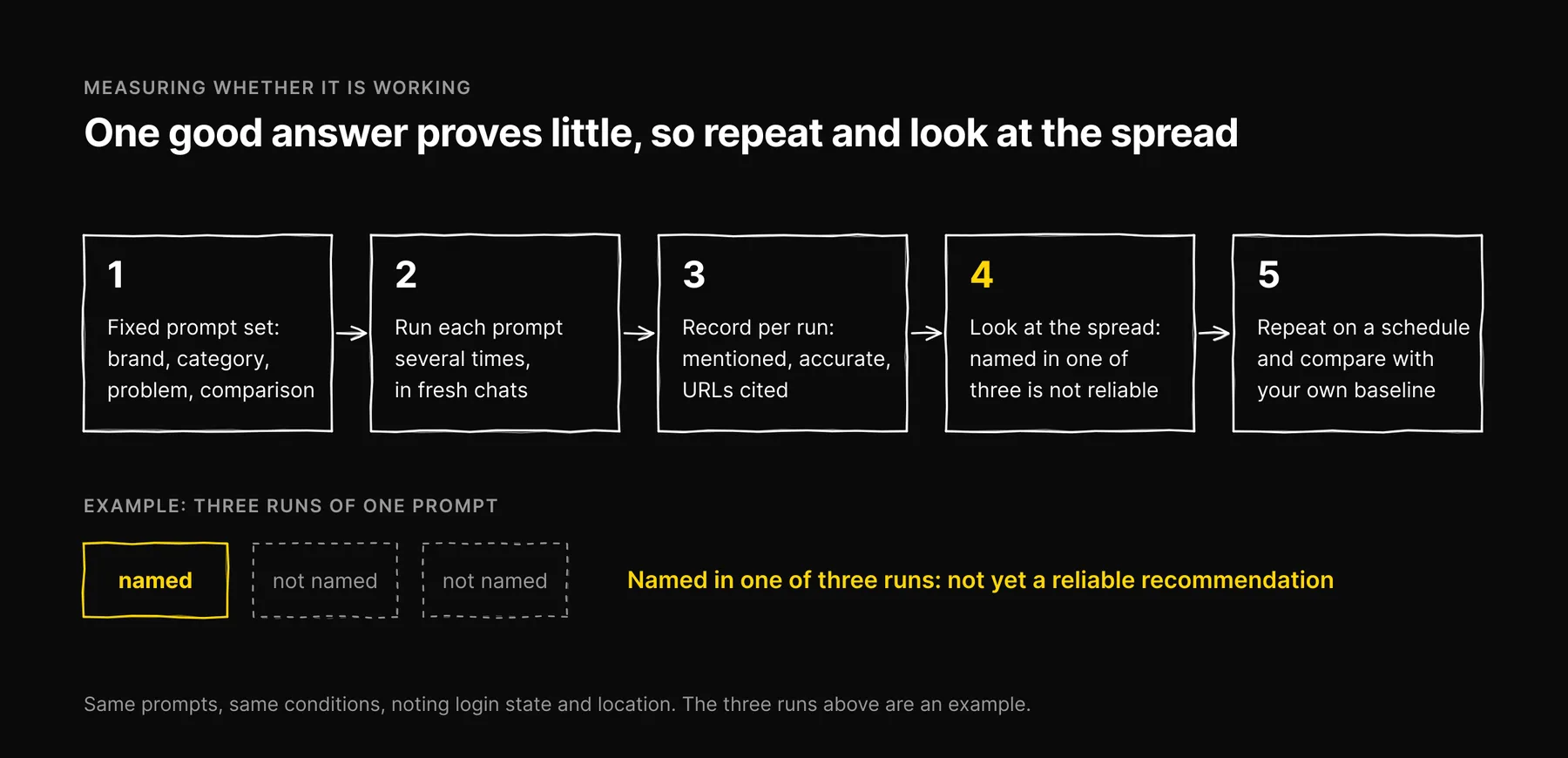
- Write a fixed prompt set: a few brand prompts ("what is [brand]"), category prompts ("best [category] for [audience]"), problem prompts and comparison prompts.
- Run each prompt several times, in fresh chats, under the same conditions each time. Note whether you were logged in and where you were.
- Record three things per run: whether your brand was mentioned, whether the description was accurate, and which URLs were cited.
- Look at the spread. A brand named in one of three runs is not yet a reliable recommendation.
- Repeat on a schedule and compare against your own baseline, not against a number from someone else's category.
In Ezeo we run exactly this on a weekly schedule: the same prompt set to ChatGPT and the other four engines we track, recording mentions and cited URLs. If an engine was not checked in a given week we show a dash, not a zero, because "not measured" and "not mentioned" are different findings. Our step-by-step AI visibility audit has the spreadsheet if you want to do it by hand.
What we cannot tell you
We cannot tell you how long any of this takes. Timing depends on when OAI-SearchBot recrawls you, which providers a given answer draws on, and whether the prompt triggers a search at all. What we can say is that the checks above remove the common reasons ChatGPT cannot use your site, and that repeated measurement is the only way to know whether anything changed.
What changed in the September 2026 update: ChatGPT draws on four paths, not just training data and Bing, and Bing is one input to ChatGPT search, not the switch that controls it. Timelines, an impact table and a before-and-after example that were never measured are removed.
Frequently asked questions

Written by
Jose Antonio Mijares
SEO & GEO Expert | Founder at Ezeo