
Short answer: Since November 10, 2026, you can claim your business in ChatGPT. In OpenAI's new Business Hub, a verified business updates its details, adds a product feed with prices and availability, and sees aggregated insights: how often ChatGPT mentions it, profile views, website clicks and "discovery topics", the themes of conversations where its site is cited. It's the first first-party number ChatGPT has given brands. It doesn't show the prompts behind a mention or how you compare with competitors, so keep measuring those yourself.
Everything here comes from OpenAI's announcement, the Businesses in ChatGPT page and the Business Agents Policy, all dated November 10, 2026. It's a beta.
What OpenAI launched
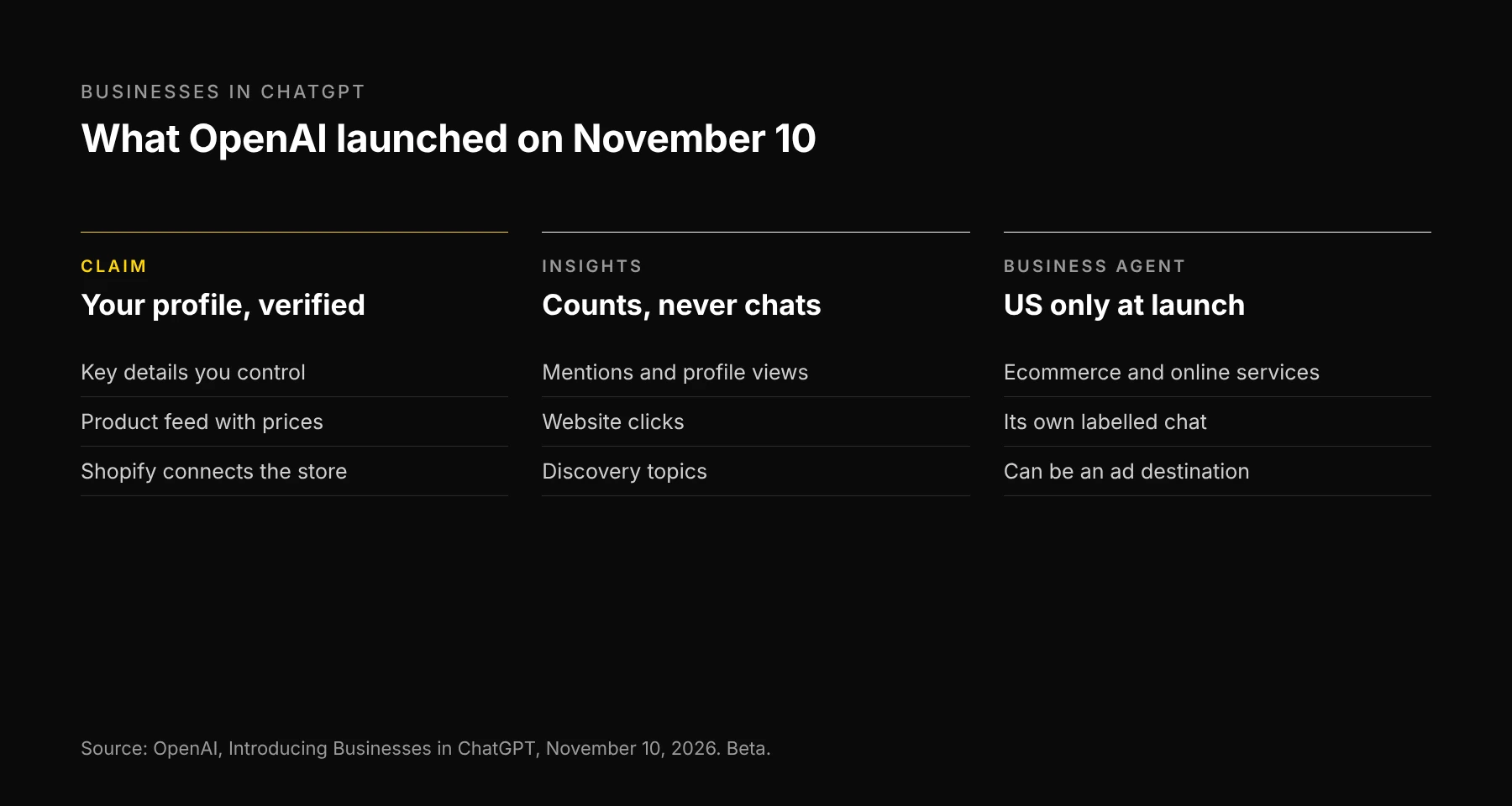
Business Hub. At chatgpt.com/business-hub, any eligible business located where ChatGPT is available can claim its business. Once verified, it can update key details and add self-service product feeds with pricing and availability, which ChatGPT may use to answer questions. Shopify merchants can connect their store from Business Hub or the Shopify admin to streamline verification, and their eligible products are already in ChatGPT through Shopify Catalog. Enterprise customers and advertisers can go through their OpenAI representative.
Insights. Mentions, profile views, website clicks and discovery topics. OpenAI says insights are aggregated, appear only above certain conversation thresholds, and never include users' conversations.
Business Agents. A verified business can build an agent that answers questions from its ChatGPT profile, in a separate, labelled conversation, and can sponsor it as the destination of a ChatGPT ad. At launch: eligible ecommerce and online-service businesses in the United States.
OpenAI says ChatGPT has 1.2 billion weekly users, and it hasn't published a price for any of this.
Shopify stores: the ChatGPT app
For Shopify, the route is OpenAI's ChatGPT app in the Shopify App Store, free to install. On launch day Shopify said merchants who connect through it are verified automatically. According to the listing, the app:
- Syncs your product catalog to Business Hub automatically.
- Publishes a Business Agent that answers shoppers' questions and suggests products, with store details and guidelines you control. Business Agents are US only at launch.
- Runs ChatGPT ads from your Shopify catalog and Pixel, with an existing or new ChatGPT ad account, and reports performance inside Shopify.
Two things to check before you install it. It asks for customer data (names, email addresses, IP addresses and browsing behaviour) and edits your web and server pixels, which the ads side needs. And it first launched on September 3, 2026 as the ChatGPT ads app: on November 10 it had a 2.0 rating from 26 reviews, most of them about ads, with products stuck at zero in the feed and small budgets gone in under an hour. Connect it for the profile and the catalog, confirm in Business Hub that your products and prices actually arrived, and treat ads as a separate decision.
What the insights tell you, and what they don't
Until now, the only way to know whether ChatGPT named your brand was to ask it, many times, and count. Business Hub gives you OpenAI's own totals, which is a real change: mentions and clicks are measured on all conversations, not on a sample of prompts you chose.
Discovery topics are the useful part. They're the themes of conversations where your website is cited. A topic you don't expect usually means an old page still says something you no longer do. A topic you expect and don't see usually means no page answers it directly.
Mentions without clicks are a signal too. If ChatGPT names you and nobody clicks, the answer is already complete without your site. Pages with something the answer can't hold, a live price, stock or a calculator, are the ones that earn the click.
What it leaves out:
- The prompts. You see themes, not the questions people asked.
- Competitors. There's no comparison with who gets named instead of you.
- Small brands may see little. Insights appear only above OpenAI's privacy thresholds, so a business with few conversations may not see numbers at first.
- Other engines. It's ChatGPT only. Google's AI Overviews and AI Mode have their own report in Search Console (how to read it).
How to read it next to your own tracking
- Business Hub for totals. How often ChatGPT names you and sends clicks, and the topics around it.
- Tracked prompts for the why. The questions your buyers ask, run on a schedule, tell you which ones name you and which competitor is named when you aren't. Ezeo runs those prompts on ChatGPT and Perplexity, plus Google's AI Overviews.
- Your analytics as a cross-check. Business Hub's website clicks and the chatgpt.com referrals in GA4 should move together. If they don't, check how your analytics tags that traffic before you trust either number.
- Your pages as the fix. Topics and prompts both point at pages. Update the one that's stale, write the one that's missing, and give the answer a reason to send the click.
What to do this week
- Claim your business from a company email address and make the profile's details match your website word for word.
- Add the product feed if you sell online. Prices and stock are where AI answers go wrong fastest.
- Shopify stores: connect the store. Your products are already in ChatGPT through Shopify Catalog; installing the ChatGPT app is how you claim them.
- Write down your baseline of mentions, clicks and topics on day one, so next month's change means something.
- Leave the Business Agent for later unless you're a US ecommerce or online-service business, and even then read a month of insights first. OpenAI's policy requires the agent to say it's an AI, never invent prices or reviews, and never pressure people or collect sensitive data.
Does Ezeo import Business Hub data?
Not today. OpenAI hasn't announced an API for Business Hub insights, so the numbers stay in Business Hub. What Ezeo measures is the prompt-level side: which tracked questions name your brand in ChatGPT and other AI engines, and who is named instead. The two answer different questions, and you need both. For the tools that measure the prompt side, see our comparison of AI visibility tools.
Frequently asked questions