
Updated September 2026. This post covers what we learned pulling backlink data pay-as-you-go from an API in production, and how to decide whether that model or a subscription tool suits you.
Pay-as-you-go backlink data works well when you are building a pipeline: you pay per request, the rows land in your own database, and you can attribute cost to each project. It does not come with the controls a subscription tool gives you for free. You have to decide how much of each profile to fetch, cap your own spend, and tell a refused request apart from an empty one. Get those wrong and your numbers move for reasons that have nothing to do with links.
How we get backlink data
Ezeo pulls backlink data from DataForSEO's Backlinks API, billed per request. Requests are routed through an n8n workflow, and we keep a direct path to the same API as an alternative. A weekly sync refreshes each project's profile: referring domains, anchors, new and lost links, and the backlink rows themselves.
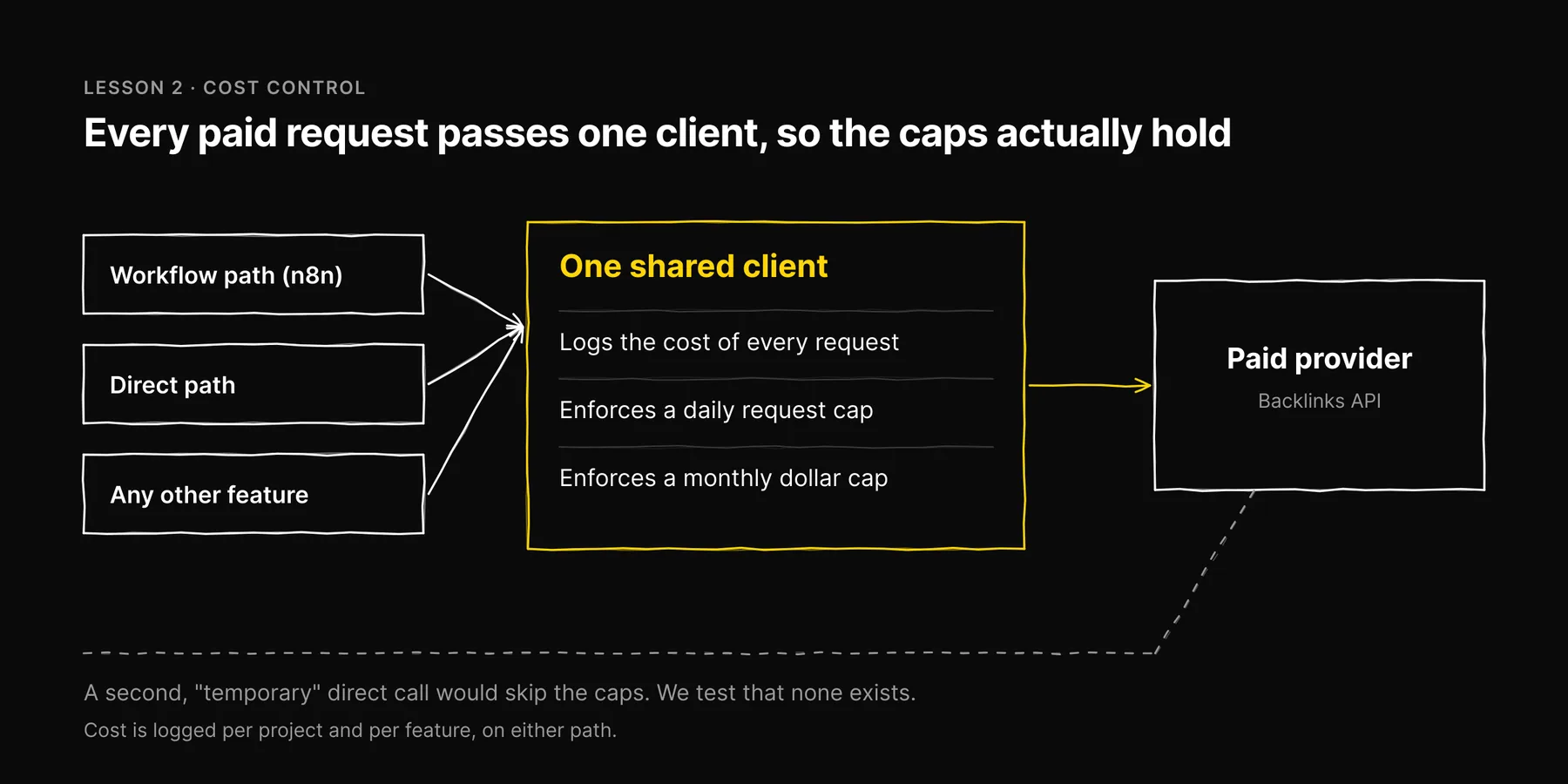
Every provider request, on either path, goes through one shared client in our code. That client logs the cost of each request, enforces a daily cap on the number of requests and a monthly cap in dollars, and refuses to send once a cap is reached.
That is the whole architecture. The lessons are in the details.
Lesson 1: coverage is a setting you chose, whether you meant to or not
A backlink API returns results in pages. How many pages you ask for decides how much of a profile you store. That choice is easy to make by accident and hard to notice afterwards.
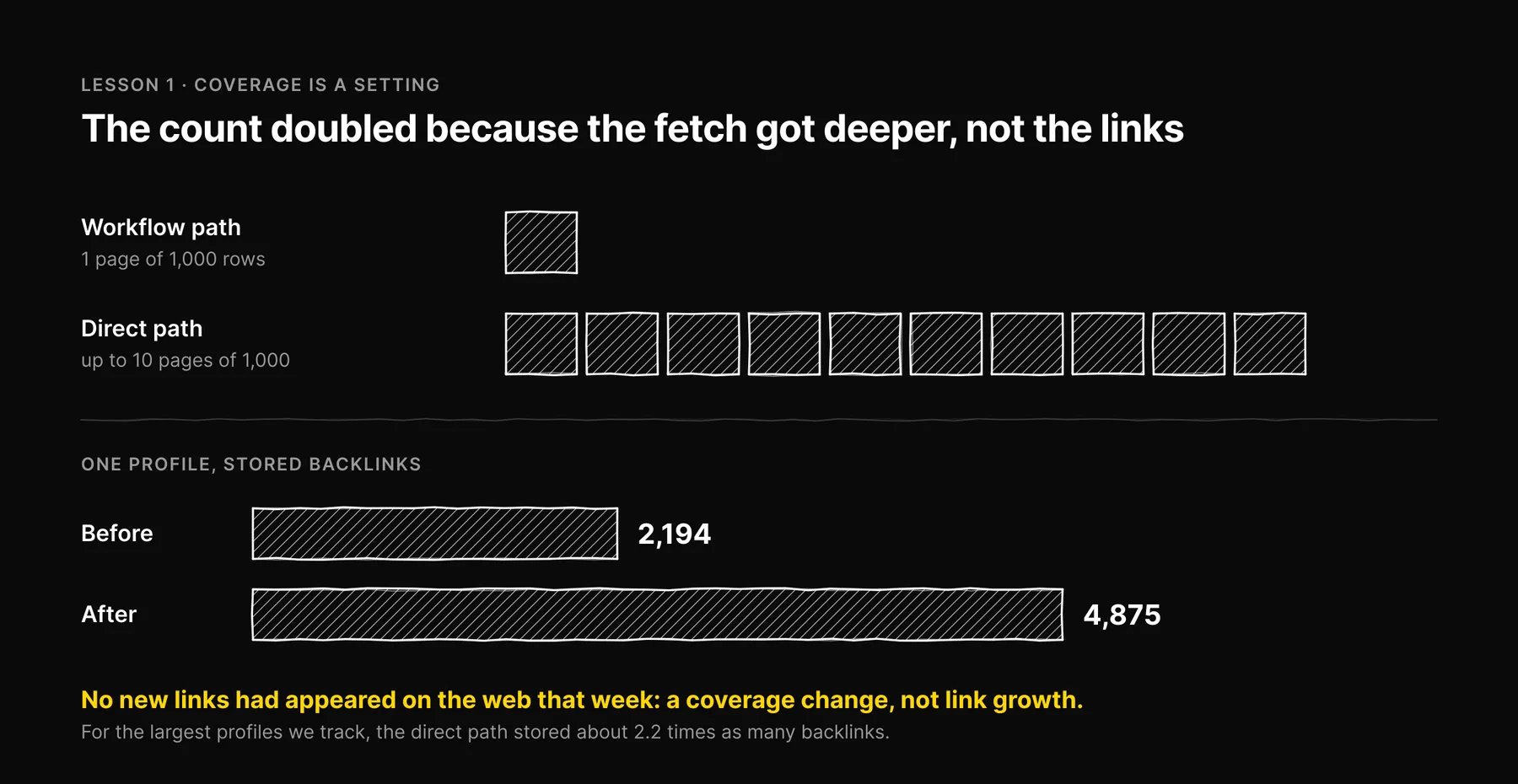
We measured it. Our workflow path fetched one page of 1,000 rows per profile. The direct path paginates up to 10 pages of 1,000 until the provider has nothing more to return. For small sites the two are the same, because the whole profile fits in one page. For the largest profiles we track, the direct path stored about 2.2 times as many backlinks.
We found this the unplanned way. When the workflow's hosting had an outage, the direct path carried the weekly sync for every project. On one profile the stored backlink count went from 2,194 to 4,875. The increase was exactly the number of rows the fuller fetch inserted. No new links had appeared on the web that week. It was a coverage change, not link growth.
If we had reported that jump to a client as progress, it would have been false, and nothing in the chart would have warned anyone.
What we do about it
- Record coverage beside the count. Store how many pages were fetched and whether the sweep reached the end of the profile. A count without that is a number without a denominator.
- Mark cutovers on the timeline. Any change in source, path or page limit is an annotation on the chart, so a step change has a visible cause.
- Compare like with like. Before you switch paths for good, run both for a full cycle and compare row counts per project. We treat that soak as the decision itself.
The general rule: when your data source changes, a jump in a metric is not a result until you have ruled out coverage.
Lesson 2: put every provider call behind one client
With a subscription, a bug cannot cost you more than the subscription. With pay-as-you-go, a retry loop or a scheduler that fires twice can spend real money before anyone looks. The fix is structural. Every request to a paid provider goes through one client, and that client does three things:
- Logs the cost of every request, tagged with the project and the feature that asked for it. That gives you cost per project and per feature without guessing.
- Enforces a daily request cap that rejects requests once it is reached.
- Enforces a monthly dollar cap measured over the current calendar month.
Because nothing can reach the provider without passing through that client, the caps actually hold. A second, "temporary" code path that calls the API directly is how caps stop meaning anything, so we test that no such path exists.
The logging also answers the question every finance conversation starts with. As one measured example: a full direct sweep of a small backlink profile cost $0.026844 in a single run and wrote 7 new rows. That is one run on one small site, not an average and not a price you should plan around. Large profiles, deeper pagination and more frequent syncs all change the figure. The point is that we can read the real number for any run, because the client recorded it.
Lesson 3: a refusal is a failure, not "no data"
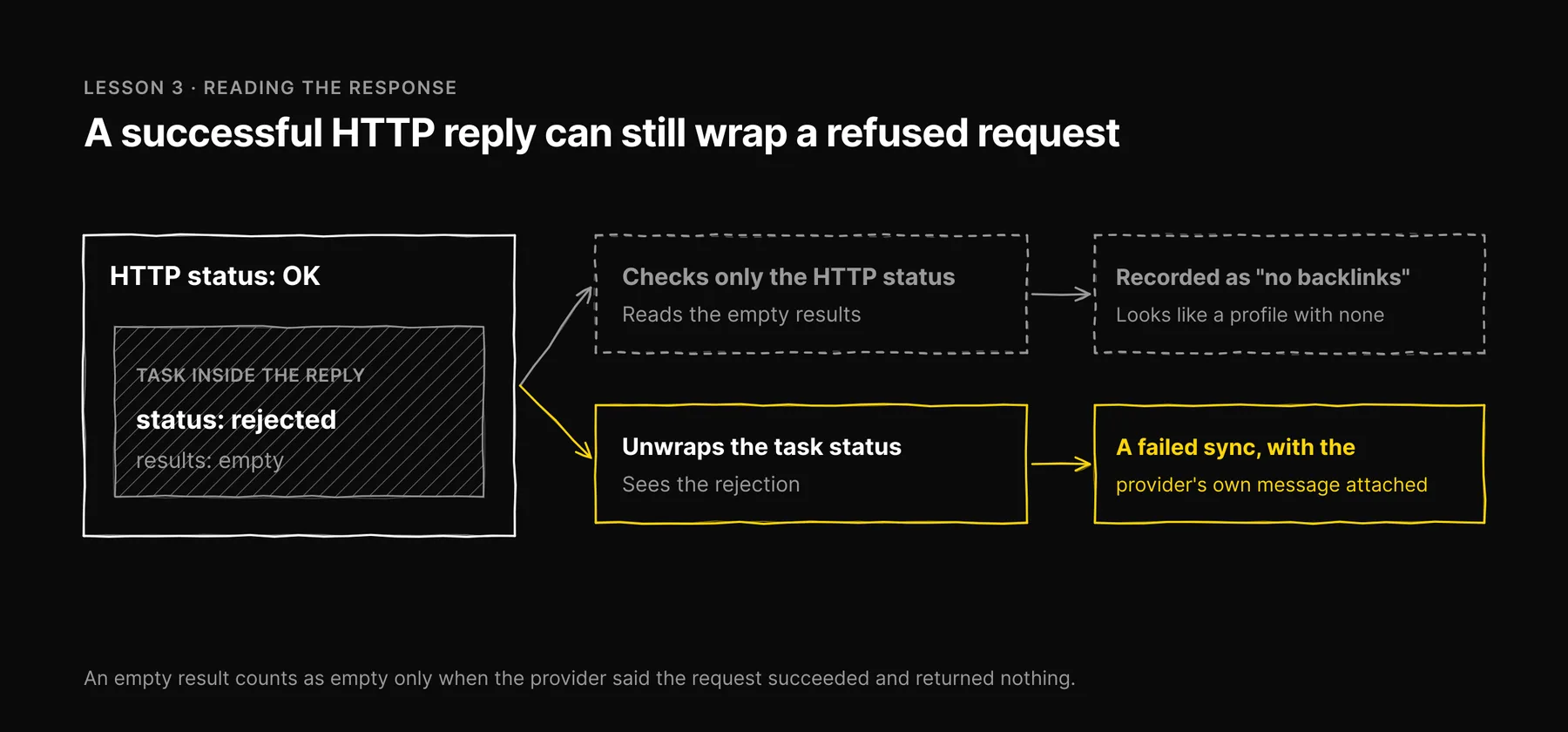
APIs like this one often answer with a successful HTTP response that wraps a task-level error inside it. If your code only checks the HTTP status and then reads the results array, a rejected request looks exactly like a profile with no backlinks.
We learned this lesson in another part of Ezeo, and it was expensive. A request with an invalid parameter was rejected by the provider on every scan. The code read the missing results as "no mentions found", every scan reported success, and months of mention data were never collected. The error had been logged the whole time. Recording a failure is not the same as detecting one.
So our backlink path unwraps the task status on every response. A rejection becomes a failed sync with the provider's own message attached. An empty result is only recorded as empty when the provider said the request succeeded and returned nothing.
Lesson 4: stop after repeated failures, and tell a person
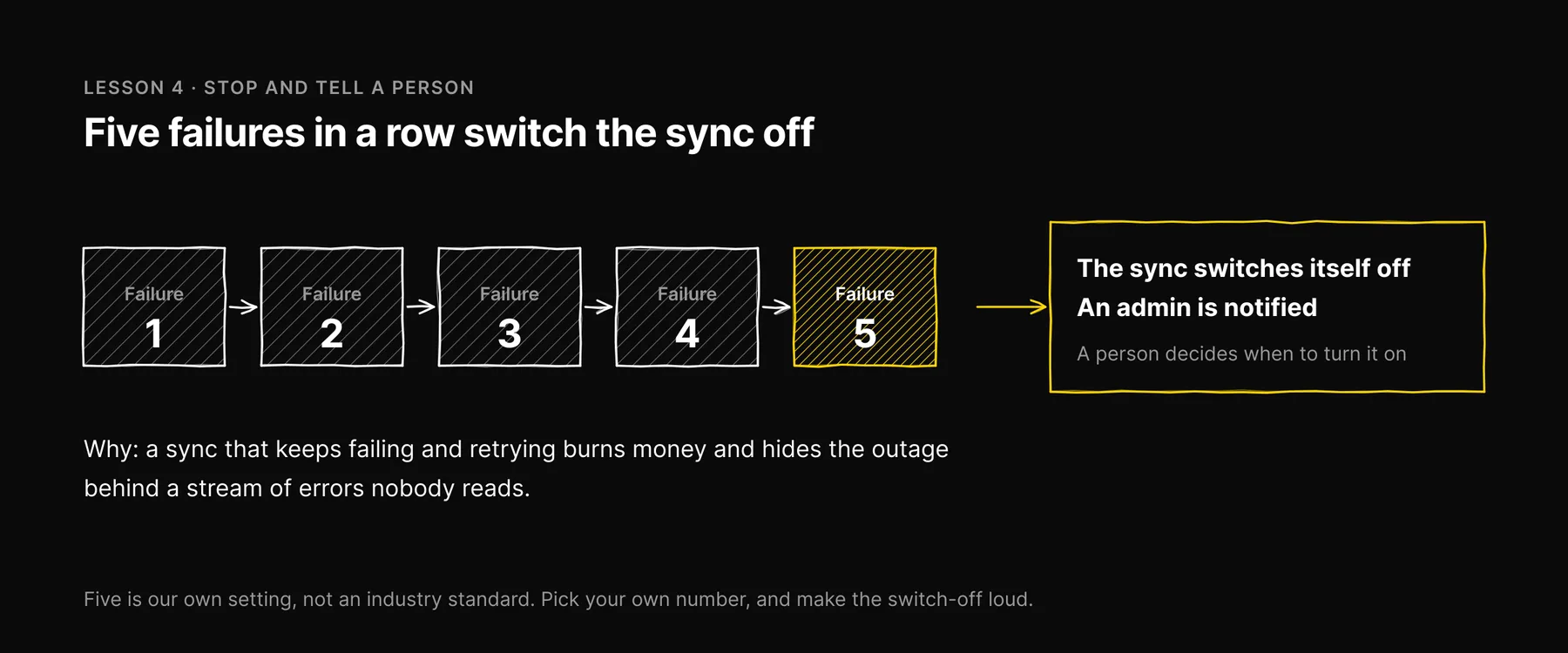
A sync that keeps failing and keeps retrying burns money on the paid path and hides the outage behind a stream of errors nobody reads. Ezeo's syncs switch themselves off after 5 consecutive failures and notify an admin. A person decides when to turn the sync back on, after looking at why it failed.
Five is our own setting, not an industry standard. Pick your own number, but pick one, and make the switch-off loud.
Lesson 5: a second path helps, as long as you know what it changes
Keeping a direct path alongside the workflow is what kept backlink syncs running when the workflow's hosting was down. That is worth having. It is also exactly how we met the coverage gap in Lesson 1: the fallback was not a copy of the primary, because it fetched more.
If you run two paths, write down how they differ, in fields and in coverage, and make the choice of which one runs first an explicit setting you can change and roll back. A silent fallback that changes your numbers is a data-quality incident waiting for someone to notice it.
When pay-as-you-go beats a subscription tool, and when it doesn't
This is editorial judgment from running both kinds of setup, not a cost model. We don't quote third-party prices we can't source or keep current. They change, they vary by plan, and the real comparison depends on your volume.
Pay-as-you-go tends to win when
- You are building a product or a pipeline. You need raw rows in your own database, joined to rankings, traffic and content data, not a dashboard someone logs into.
- You serve many projects on a schedule. Per-request billing plus per-project cost logging tells you what each client costs you to serve.
- Your usage is uneven. A weekly refresh and the occasional deep dive cost what they cost, with no seat fees in quiet months.
- You have engineering time to build the controls in Lessons 2 to 4. Without them, one bad week can cost more than the model saves.
A subscription tool tends to win when
- People, not code, are the consumers. An analyst exploring a competitor's links wants a good interface, filters and exports, which is most of what a subscription buys.
- You need the vendor's history. Long historical charts and "lost since" views are built on years of the vendor's own crawling. Rebuilding them from your own weekly pulls starts from the day you begin.
- You have no one to maintain a pipeline. Workflows break, APIs change, hosts go down. Someone has to own that.
- You want someone else's definition of the metric. A subscription tool's authority score is at least consistent within that tool. Your own counts are only as consistent as your coverage.
Many teams end up with both: an API for the numbers that feed reports, and a subscription seat for people doing research. That is a reasonable answer.
A checklist before you rely on API backlink data
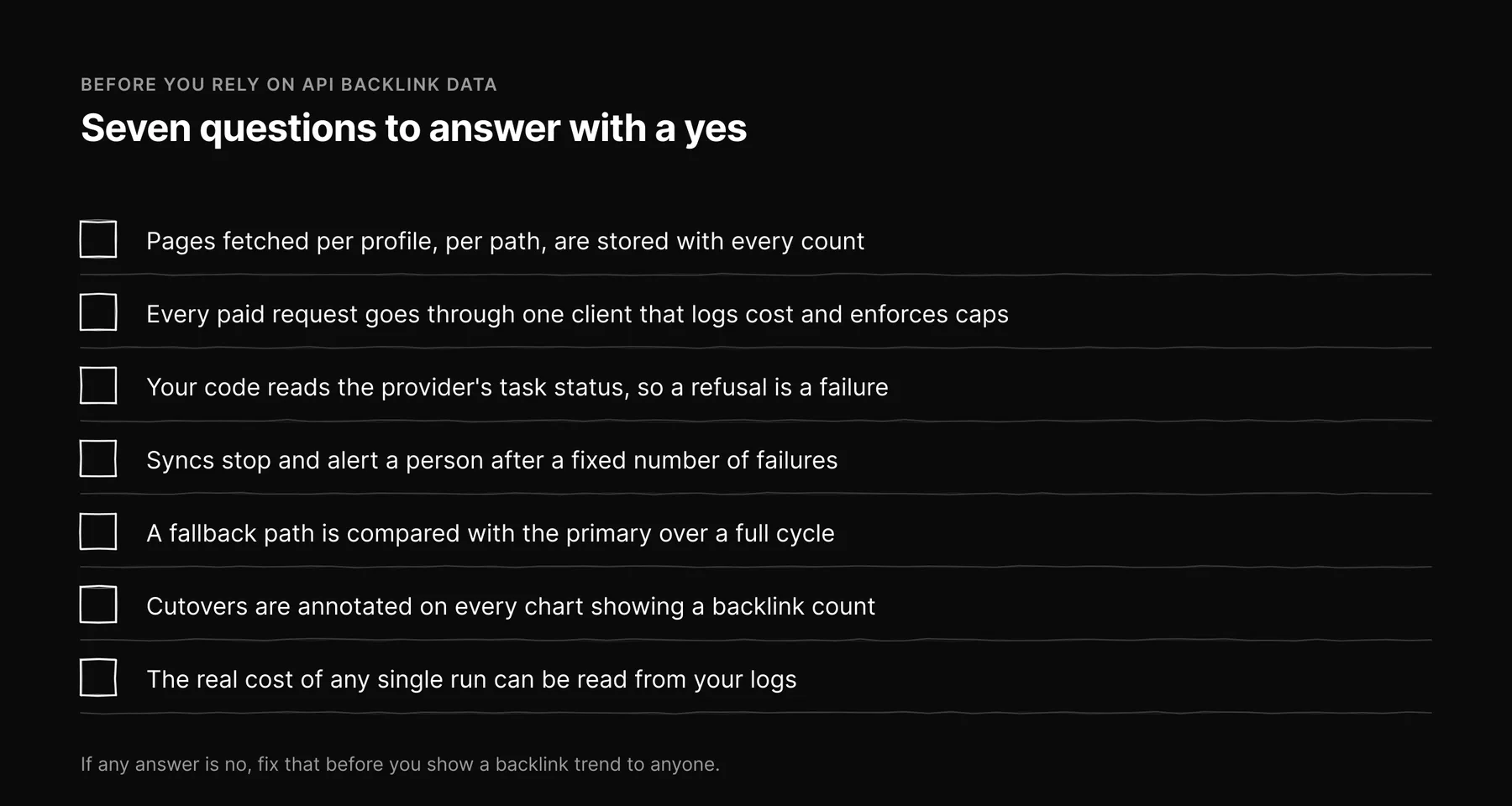
- Do you know how many pages per profile each path fetches, and is that stored with every count?
- Does every paid request go through one client that logs cost and enforces a daily and a monthly cap?
- Does your code read the provider's task-level status, so a rejection is recorded as a failure?
- Do syncs stop and alert a person after a fixed number of consecutive failures?
- If you have a fallback path, have you compared its coverage with the primary over a full cycle?
- Are cutovers annotated on every chart that shows a backlink count?
- Can you read the real cost of any single run from your own logs?
If any answer is no, fix that before you show a backlink trend to anyone.
Where backlinks fit now
Links still matter for search, and several AI answer engines draw on search indexes built from the same web. Our post on how traditional SEO and GEO work together covers why, and our explainer on what GEO is covers the answer-engine side. Whichever model you use to buy the data, the lessons above are what make the numbers trustworthy.
What changed in the September 2026 update: We removed third-party subscription prices we could not source, corrected the claim that data quality is identical however you fetch it (stored coverage differed by about 2.2x), and corrected the auto-disable threshold to 5 consecutive failures. Cache and schedule details that did not match how the system runs are gone.
Frequently asked questions

Written by
Jose Antonio Mijares
SEO & GEO Expert | Founder at Ezeo