
Key Takeaways
- Most bad SEO decisions do not come from bad strategy. They come from a number that looked right and was not.
- The most dangerous value in any report is a zero, because "measured and found nothing" and "never measured" print the same way.
- GA4 key events, per-page sessions, Search Console totals, rank positions and orphan-page counts each have a known way of misleading you. All seven traps below came from real data we measured.
- Before you act on a figure, ask three things: what was actually measured, over which dates, and what a missing value was turned into.
- A number without its coverage and its date is a claim, not a measurement.
Definition: A measurement trap is a metric that is calculated correctly from the data it was given but answers a different question than the one it appears to answer, usually because of missing data, mismatched scope, or a default value standing in for a real reading.
Why We Wrote This
Ezeo pulls data from Google Analytics 4, Search Console, Microsoft Clarity, rank tracking, site crawls and five AI assistants, and puts it in one place. Joining those sources forces you to look closely at what each number really means, because two tools that disagree cannot both be right.
Over the past months we found seven places where a figure we were showing, or a figure a client relied on, was wrong in a way no error message would ever reveal. Some were in our own product and we fixed them. All of them are common, and you may have one in your reports today. We have left client names out; the numbers are as we measured them.
Trap 1: GA4 "Conversions" That Are Not Purchases
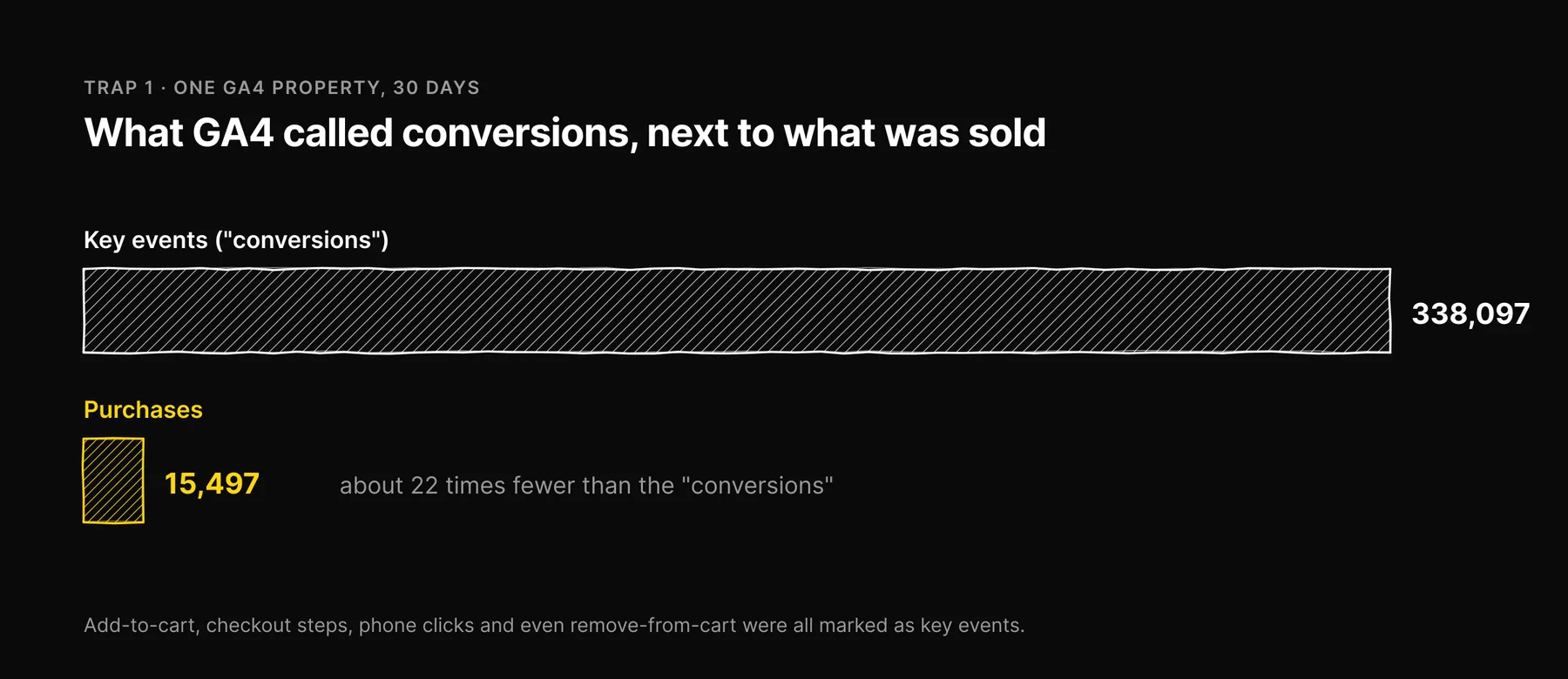
What we saw: over 30 days, one client's GA4 property reported 338,097 conversions against 15,497 actual purchases, about 22 times the number of sales. On another property the gap was more than 1,500 times.
Why it happens: in GA4, conversions (renamed key events in 2024) are whatever events the property owner marked as important. On the first property they included add-to-cart events, buy-button clicks, checkout steps, phone-link clicks and even remove-from-cart, added together with purchases. That works out at about two "conversions" per session, a figure no one could read as a conversion rate. The second property's count was mostly product views. Nothing about either number was wrong; neither was counting sales. Three other properties we connected sent no commerce event at all, so any conversion rate computed for them would have measured something other than buying.
What to do: never compare conversion counts across properties, and never report a conversion rate until you have opened the list of key events and confirmed which ones are purchases. If your goal is revenue, count purchase events only.
Trap 2: Page-Level Sessions That Add Up to More Than the Site
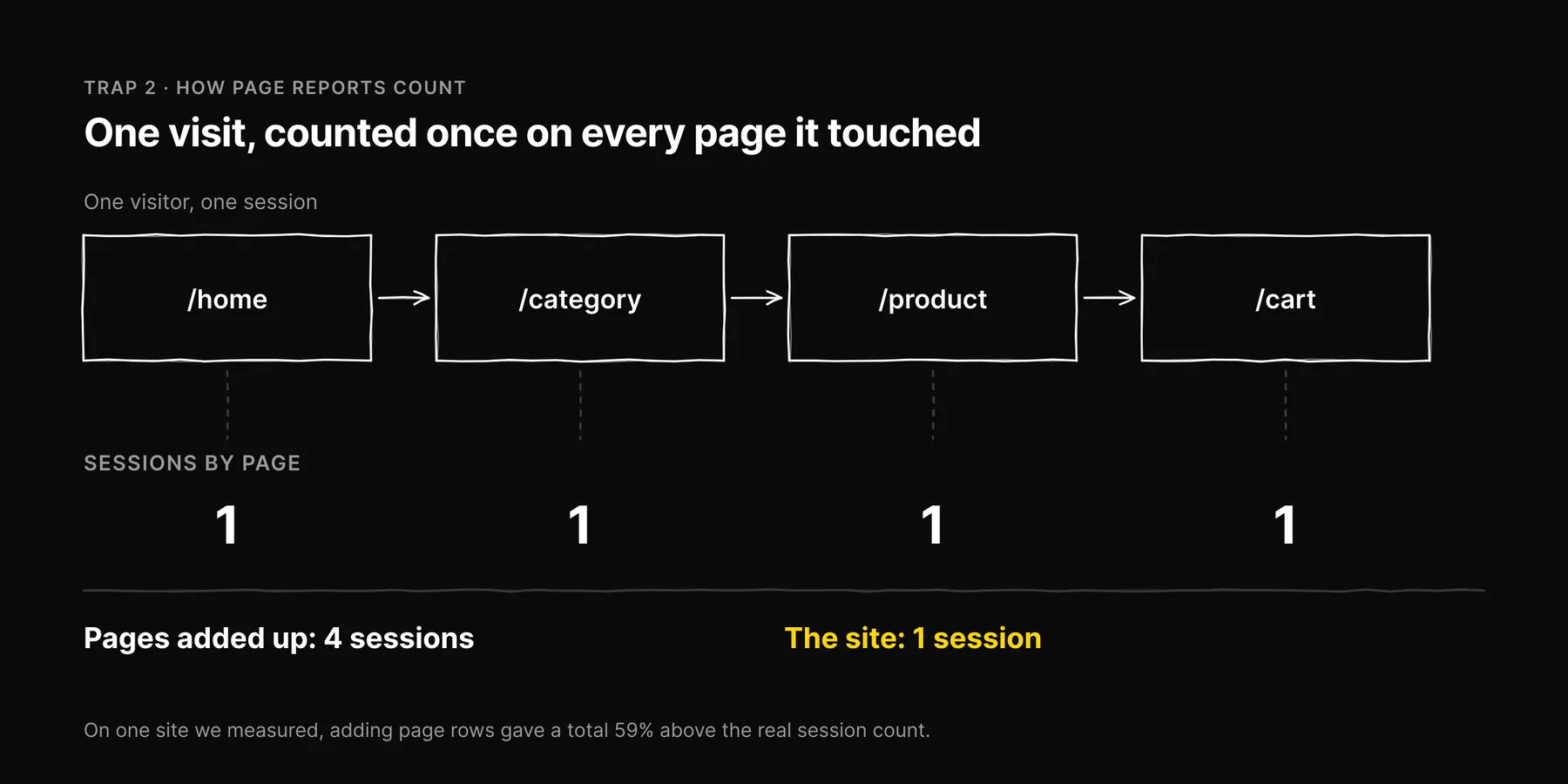
What we saw: summing sessions across every landing page and page path for one site produced a total 59% higher than the site's real session count.
Why it happens: GA4 counts a session on every page it touched. A visit that views four pages contributes one session to each of those pages' rows. Unique users behave the same way. Page-level rows are correct for their page and meaningless when added together.
What to do: take site-wide totals from a site-wide query, not by summing a page report. If a dashboard shows a site total, ask how it was computed.
Trap 3: Missing Days Stored as Zero Days
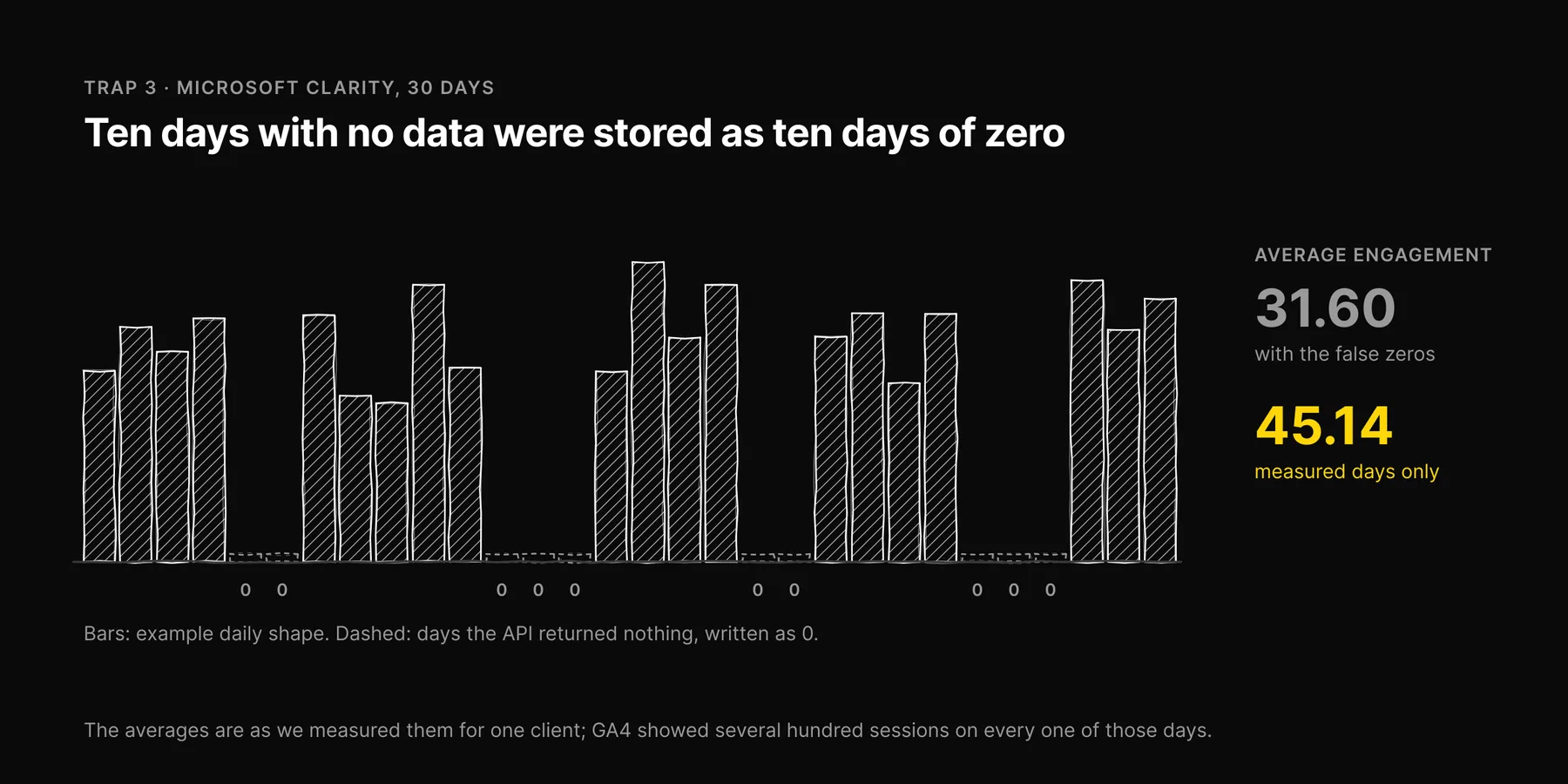
What we saw: a client whose site received several hundred GA4 sessions every day showed ten days out of thirty in Microsoft Clarity with no activity at all. The dashboard concluded "no user frustration detected", and the average engagement figure read 31.60 against a real 45.14 once those days were removed.
Why it happens: when an API returns an empty response for a day, a sync job has to decide what to store. Writing zeros is the easiest choice, and it produces a day that looks exactly like a measured day with no traffic. The averages then include those false zeros, and every sync still reports success.
We found the same pattern in GA4. A request that asked only for some metrics could write zero into the metrics it had not asked for, over its whole date range. For two clients, opening a revenue report quietly overwrote a month of site-wide session counts with zeros. The sync reported success for a month, because as far as it knew, it had succeeded.
What to do: treat a sudden run of zero days as a data question before a performance question. In any pipeline you control, store "not reported" as empty, never as zero, and keep "how many days were actually measured" next to every average.
Trap 4: Search Console Totals From the Wrong Table
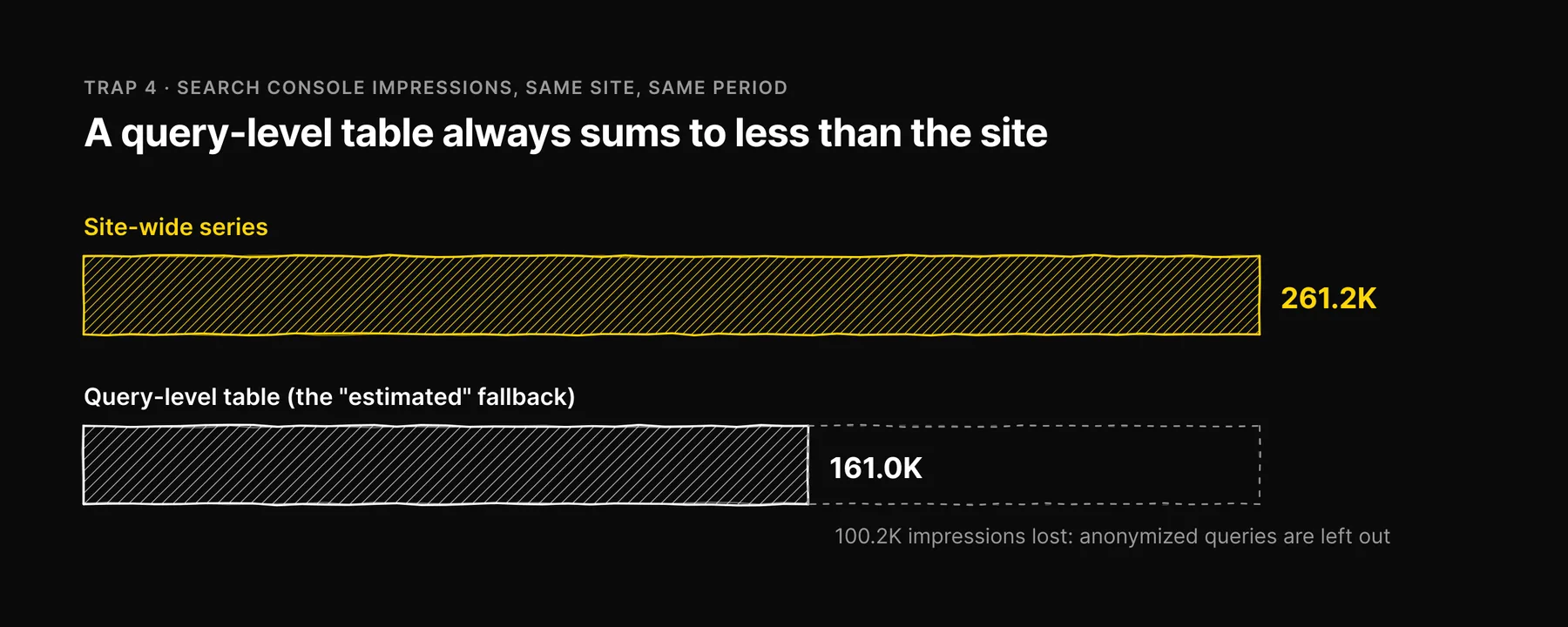
What we saw: an impressions figure of 161.0K on a dashboard where the site's real total for the period was 261.2K. The lower figure was labelled "estimated".
Why it happens: Search Console reports differ depending on how you ask. A query-level report omits anonymized queries, so it always sums to less than the site-wide total. Our figure came from a fallback that switched to the query-level table whenever a single day was missing from the site-wide series, and lost more than a third of the impressions in the swap. On top of that, the most recent days in Search Console are incomplete for roughly three days, and a sync that fills in dates the API did not report makes a partial window look complete.
What to do: take totals from the site-wide series, end your window a few days before today, and report how many days in the window were actually returned by Google. If a number is labelled "estimated", find out what it is estimating from.
Trap 5: "Position 101" in an Average Ranking
What we saw: tracked keywords carrying a position of 101.
Why it happens: rank trackers typically check the top 100 results. When a keyword is not found, some tools record a placeholder just past the end, such as 101, so the column is never empty. That placeholder is not a position. Averaged with real positions, it drags the average down by an amount that depends only on how many keywords were missing, and a keyword moving from "not in the top 100" to position 95 looks like a small gain when it is the biggest change it can make.
Our own tracked keywords show it. As of September 2026, "answer engine optimization" was not in Google's top 100 for ezeo.ai, and the tracking row said 101.
What to do: report "not ranking" as its own count, separate from the average position of keywords that do rank. Never average a sentinel value.
Trap 6: Every Page Is an Orphan
What we saw: an internal-linking report stating that all 442 of a store's 442 pages were orphans, with a link health of 0%.
Why it happens: an orphan page is one that no other page links to. You can only know that from a crawl that followed the site's links. The report was reading a link graph that held no rows at all, and "no links found" became "no links exist". The same empty graph later showed up on an overview card that reported zero internal links for a site whose crawled graph held more than 27,000.
What to do: an orphan list is only meaningful alongside the crawl's coverage: how many of the site's known pages the crawl reached. If coverage is low or unknown, "not seen" means unknown, not orphan.
Trap 7: A Zero AI Visibility Score for Assistants Nobody Asked
What we saw: in our own AI visibility history, checks that had queried only Google AI Overviews also stored a zero for ChatGPT and a zero for Perplexity.
Why it happens: the record had a column for every assistant, and the columns that were not filled defaulted to zero. The result looked like a full sweep in which we were absent everywhere. It was a sweep of one surface.
What to do: for any AI visibility report, yours or a vendor's, ask which assistants were actually queried in each run. A surface that was not checked should show as not measured. We wrote a separate guide on what an AI visibility score actually measures because this trap is so easy to fall into.
The Pattern Behind All Seven
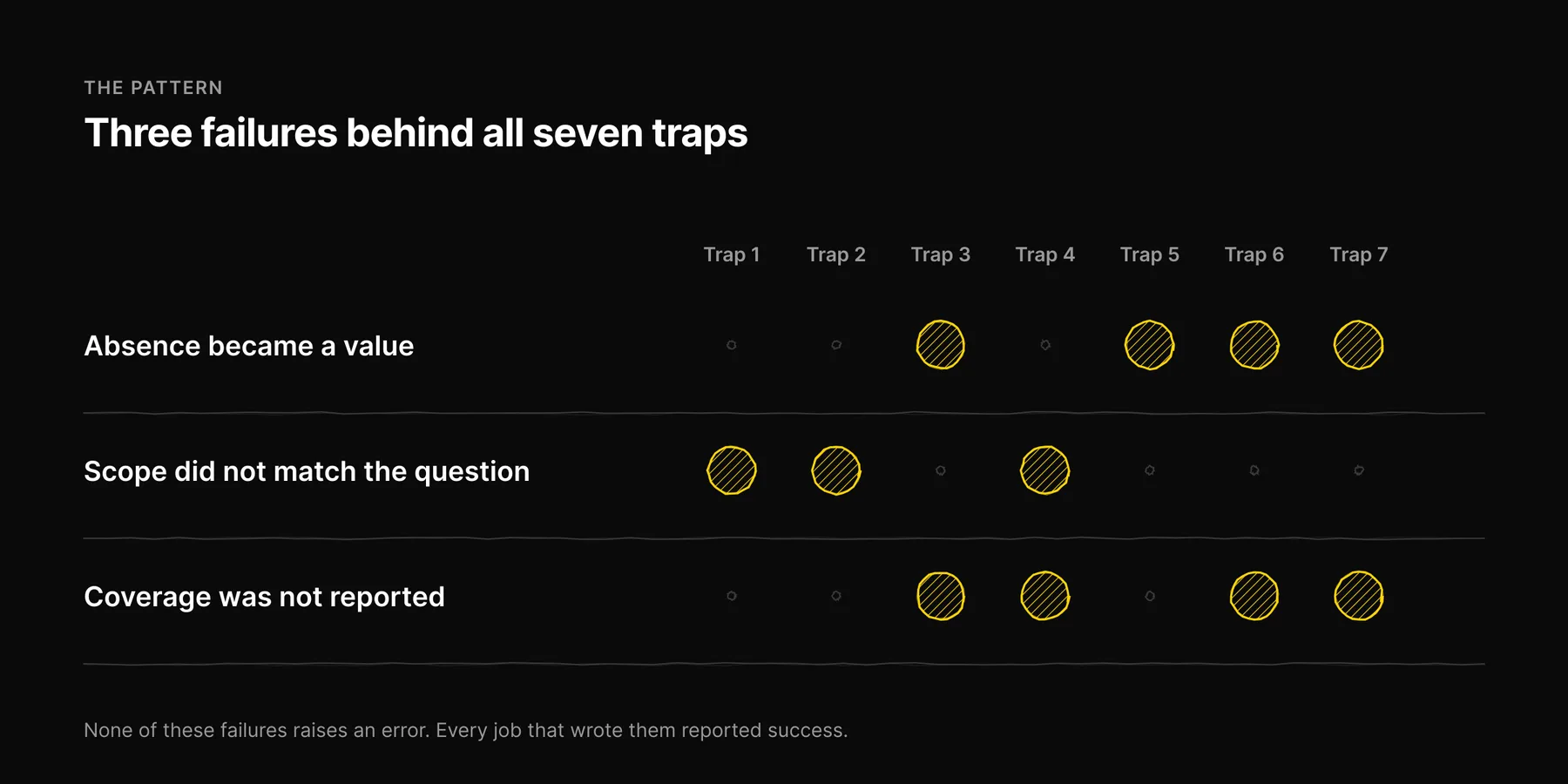
Look at the seven again and the same three failures repeat.
| Failure | Traps | The question that catches it |
|---|---|---|
| Absence became a value | 3, 5, 6, 7 | What was a missing reading turned into? |
| Scope did not match the question | 1, 2, 4 | What exactly is being counted, and at what level? |
| Coverage was not reported | 3, 4, 6, 7 | How much of the period, site or surface set was actually measured? |
None of these produce an error. Every job that wrote them reported success. That is what makes them dangerous: a failure that shouts gets fixed, and a failure that looks like a normal Tuesday gets reported to a client.
A Five-Minute Checklist for Any SEO Report
- Check the dates. Does the window end before the source's reporting delay? Is every figure dated?
- Find the zeros. For each zero, ask whether it was measured. Look for runs of zero days.
- Check the scope. Are site totals taken from site-level data, not summed from pages? Are "conversions" purchases?
- Look for placeholders. Positions of 100 or 101, scores of exactly 0 or 100, and identical values across many rows are often defaults.
- Ask for coverage. Pages crawled out of pages known, days reported out of days in the window, surfaces checked out of surfaces supported.
How This Shapes Ezeo
Every trap above changed how Ezeo works. Absent values render as a dash, never as a zero. Averages report how many days or runs they cover. Site totals come from site-wide data. Orphan reports require crawl coverage. AI visibility is reported per surface, with the date each one was measured. And we publish our own project's figures on our home page, including the unflattering ones, with the date they were read.
We think that is the minimum a measurement tool owes you. If you would like to see your own data held to the same standard, book a call.
Frequently asked questions

Written by
Jose Antonio Mijares
SEO & GEO Expert | Founder at Ezeo